
Catch the impression drops that cost you sales.
Which of your ads quietly stopped serving this week, and what did it cost while nobody was looking?
From the team operating $12B in GMV.
Impressions swing every day. The drops that hold are telling you something.
A drop that lasts four to seven days is almost always something specific, and something you can fix.
A campaign lost top-of-search
Bids fell behind the auction, or a competitor moved. The ad still runs. It just stopped being seen.
A keyword slipped in rank
Organic position softened, and the paid impressions that used to ride alongside it went with it.
A listing got suppressed or lost the Buy Box
Nothing wrong with the campaign at all. The problem is upstream of it, and the spend keeps running.
The cost of missing one is not linear. Lost impressions cost sales while they last, and once sales velocity slips, BSR and organic rank follow it down. Fixing the ad on day seven does not hand the position back. You buy that back.
The check itself is simple. Doing it every morning is the hard part.
Pick the one that matches how many ads you are responsible for.
01
By hand
You look
02
The Claude skill
You run it
03
Qore
It runs
It learns what normal looks like for each ad, then tells you what stuck.
The skill reads the range each US ad normally runs in over 30 days, flags the days that land well outside it, then reads the last week to see whether the move held. What it finds comes back in three buckets.
Act now
The drop has held for several days. Sales are at risk today.
Watch
It only started today. Early warning, low priority.
Scale
Impressions surged and stayed up. Fund it before it cools.
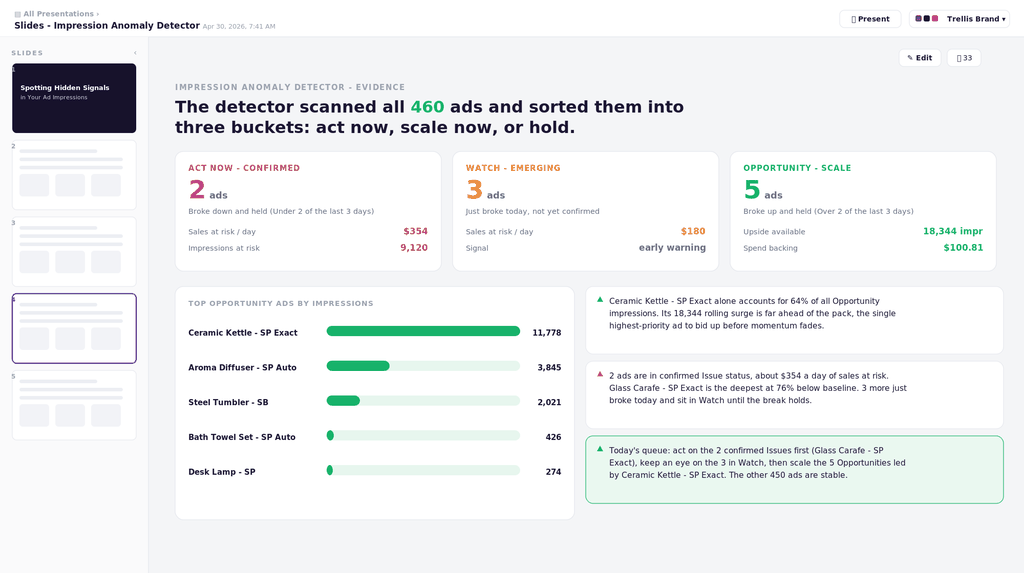
The same run, output in Qore. Every finding is sized against your own daily sales, so it reads the same at any volume.
Two ways to take it. Both are free.
No form, no email required. Take the file if you use skills, take the prompt if you do not.
The skill file
One zip, uploaded to Claude as-is: the SKILL.md, a tested reference script, the prompt version, and the install steps. It pulls the impressions, runs the check, and returns the ranked list.
- Every US ad scored against its own range
- Sales at risk and upside available per ad
- One ranked list, worst first, with the reason it flagged
Requires your ad data connected to Claude over MCP.
Or just the prompt
Not using skill files? Paste this into Claude with your ad data connected.
Using my connected Amazon ad data, pull daily impressions per US advertisement for the last 61 days (include attributed sales if the source has them).

For each advertisement: compute a 30-day rolling mean and standard deviation of daily impressions, using the prior days only. Flag each day Over if impressions are above mean + 1.5 standard deviations, Under if below mean - 1.5, otherwise Normal. (1.5 is the sensitivity dial: lower catches more, higher only the clearest breaks.)

Mark an ad Watch the day it first breaks in either direction. Once the break holds (anomalous on 2 of the last 3 days), confirm it: Act now for a sustained drop, Scale for a sustained surge. Ads back to Normal stay off the list.

Return Act now first, then Watch, then Scale, ranked by the change in attributed sales versus baseline. For each: advertisement id, label, the last 3 daily flags, latest vs expected impressions, and the sales change per day.

Then one ROI line for the run: ads flagged, total sales at risk per day, total upside per day, each also as a share of daily sales.

For each Act now ad, name the most likely cause to check first, in this order: budget capped mid-day, bid lost top-of-search, keyword rank slip, Buy Box loss or listing suppression, out-of-stock throttling, then external. Treat sales figures as directional and confirm the cause before spending against it.
Same logic as the file, minus the tuning options.
One setting in the file controls sensitivity: how far outside its normal range a day has to land before it flags. The default only flags clear breaks. Lower it to catch smaller moves earlier, at the cost of more noise in the list.
Three steps, once.
Connect your ad data
Claude reaches your Amazon ad data over MCP. If that connection is not in place yet, this is the step that takes the setup time.
Install the skill, or paste the prompt
Drop the SKILL.md into Claude, or use the prompt above. Both produce the same ranked list.
Run it each morning
It reads data and returns a ranked list. It does not change bids, budgets, or anything else in your account.
The three questions we get every time.
Do I need Claude Code, or does this work in the app?
Either works. The skill is a single file you install in Claude, and the prompt version runs in a normal conversation. What matters is that Claude can reach your ad data, not which surface you are in.
Does it change anything in my ad account?
No. It reads impressions and sales, scores them, and hands back a list. Every decision stays with you. Nothing gets paused, negated, or rebid because a check flagged it.
What data does it touch?
Daily impressions and attributed sales per ad for the last 61 days, which is what the 30-day range and the last-week read are built from. It pulls through your own connection, so the data path is yours, not ours.
Qore runs this check for you, across every account, every morning.
Qore is the workflow layer of the Trellis platform. You describe a check once, it gets locked into a workflow, and it runs on a schedule against every account you manage.
Connected on day one
No MCP setup on your side. Your ad data is already there.
Runs every morning
Every account checked before you open it, with nothing to remember.
Tuned to each portfolio
Sensitivity, cadence, and thresholds set in the interface, not in a file.
One queue for the team
The same ranked list, worked top down, so nothing gets checked twice.
See this run on your accounts
We will run the anomaly check against your own data on the walkthrough, so you see what it finds before you decide anything.
Qore is in beta · requests approved manuallyIf your setup is not a fit, we will say so. No pressure either way.
One useful climb a month.
The Climb is Trellis’ monthly newsletter: quick updates from Amazon, Walmart, and the other marketplaces, upcoming webinars, and the practices driving profitability right now.