





Amazon shoppers don’t buy blind. They compare star ratings, scan recent comments, and look for patterns that confirm they’re making a safe choice. This means that review management is a critical part of any Amazon seller’s operations: it’s conversion-rate optimization, brand protection, and (indirectly) an SEO lever for Amazon search.
But of course, negative reviews happen even to great sellers. The goal with review management isn’t to game the system by removing every negative review, though. It’s to respond strategically to competitor attacks, fix root issues shown by multiple bad reviews, and remove negative reviews that legitimately violate Amazon's policies.
It’s simple math: by removing bad reviews and making more positive ones, you can boost your all-important star rating. Let’s break down the impact of negative reviews on your Amazon store and how you can handle them.
Want to see what this looks like in real life? Check out Trellis’ Success Stories to learn how brands have improved performance on Amazon and Walmart with smarter advertising, pricing, and analytics.
Key Takeaways
- Negative reviews can lower conversion rates, increase ad costs, and slow organic momentum, so it’s worth it to address them.
- Not every negative review can and should be removed. But if they violate Amazon’s rules, it’s always worth requesting their takedown to protect your business reputation.
- Your best defense is proactive: aggressive removal of fake or irrelevant feedback, better customer expectation management, better support, and a consistent review-request process.
Want more practical Amazon and Walmart growth tips each month? Subscribe to The Climb, Trellis’ monthly newsletter with quick updates and insights designed to help your eCommerce business grow.
How Negative Amazon Reviews Impact Sales
Customers browsing Amazon will typically look at an item’s overall rating first. Naturally, the higher the star rating, the more likely a customer thinks that the product is of good quality. Meanwhile, a product with a lower rating will be seen as lower in quality. Sometimes this is true even if there’s only a difference of 0.2 to 0.5 in star rating. Research shows 92% of consumers don’t even consider buying a product unless it has more than 4+ stars.
Likewise, 86% of shoppers refuse to purchase from sellers with "more than a few" negative reviews. This means that if you want to earn the trust and loyalty of Amazon customers, you’ll need to optimize your product reviews so that positive and genuine feedback shines. Here are things that your star rating can affect:
Seller Rating
Amazon tracks how reliably you deliver a good buying experience, and that shows up in your seller performance metrics. While product reviews shape how shoppers feel about an item, your seller-side metrics reflect things like order defects, shipping and fulfillment issues, and customer service.
When your performance is strong, you earn more trust from Amazon and from customers. When it slips, you may see less visibility and fewer sales opportunities. That’s why negative reviews or feedback are worth addressing quickly.
Buy Box
The Buy Box (now called the “Featured Offer”) is the spot on a listing where shoppers can click Add to Cart or Buy Now without thinking twice. If multiple sellers offer the same product, the seller who wins the Buy Box gets the sale most of the time, simply because that’s the default option shoppers choose.
Strong performance history and customer trust signals help you compete for it. When review sentiment or service issues drag down confidence, you’re potentially losing the most valuable real estate on the page.
Advertising Effectiveness
Ads can get you traffic fast, but they can’t “outspend” a credibility problem. If someone clicks your Sponsored ad and then sees a low star rating or a string of recent complaints, they often bounce or keep shopping around.
That means you pay for clicks that don’t convert, your ACoS climbs, and scaling gets harder. So those bad reviews? They can quietly drain your ad budget, too.
How To Remove Negative Amazon Reviews
Review management begins with checking for any issues and identifying their causes. A thorough assessment of your catalog’s reviews can help you figure out if these are policy-violating feedback or low reviews caused by legitimate issues.
Let’s run down how to jumpstart your review management and removal process:
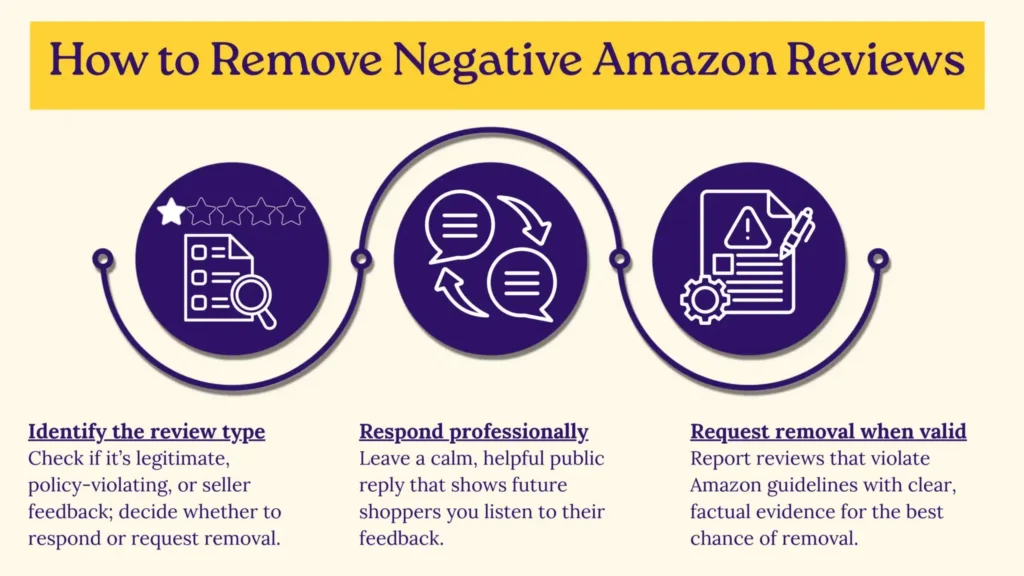
Identify What You’re Dealing With
Before you take action, classify the negative content.
- If it’s a product review that’s legitimate, you can reply directly to these with good customer service. These shouldn’t be removed; instead, work on addressing the issues they raise to gain more positive feedback and show customers that you take these concerns seriously.
- If it’s a product review that could be fake or violates Amazon’s policies, you can file a removal request with Amazon.
- If it’s seller feedback, you can file a removal request if the issue was caused by something outside your control, such as fulfillment problems handled by Amazon FBA.
Respond Like A Brand, Not Like A Seller
When you see a negative review, don’t treat it as an argument to win. Treat it as a public support ticket. If your account has the ability to leave a public comment on reviews, use it to do three things:
- Acknowledge the issue without defensiveness
- Offer a clear resolution path (replacement, refund guidance, troubleshooting)
- Reinforce expectations (correct usage, sizing, compatibility, setup tips)
Keep it concise, professional, and helpful to future shoppers reading the thread. Remember: your response is less about changing that reviewer’s mind and more about showing the next 1,000 shoppers that your brand stands behind the product.
Request Removal The Right Way (When It’s Actually Removable)
Run your ASINs through an Amazon review checker to see if there are any suspicious negative reviews. Amazon may remove a review if it violates its Community Guidelines. Common examples include:
- Hate speech, harassment, or obscene content
- Personal information (phone numbers, addresses, etc.)
- Reviews that focus on shipping or packaging issues instead of the product
- Promotional content or obvious conflicts of interest
- Repeated copy-paste spam across listings
Here’s how you can report a review:
- Go to the review on the product detail page.
- Use the report option (often labeled “Report abuse” or similar).
- Provide a brief, factual explanation of the guideline violation. Add documentation like screenshots to back up your claim.
If you escalate through support channels, keep your message short and evidence-based. The more you sound emotional, the less likely you are to get traction.

Reduce Negative Feedback With A Simple Review-Prevention Checklist
Here are practical fixes that reliably reduce negative review frequency:
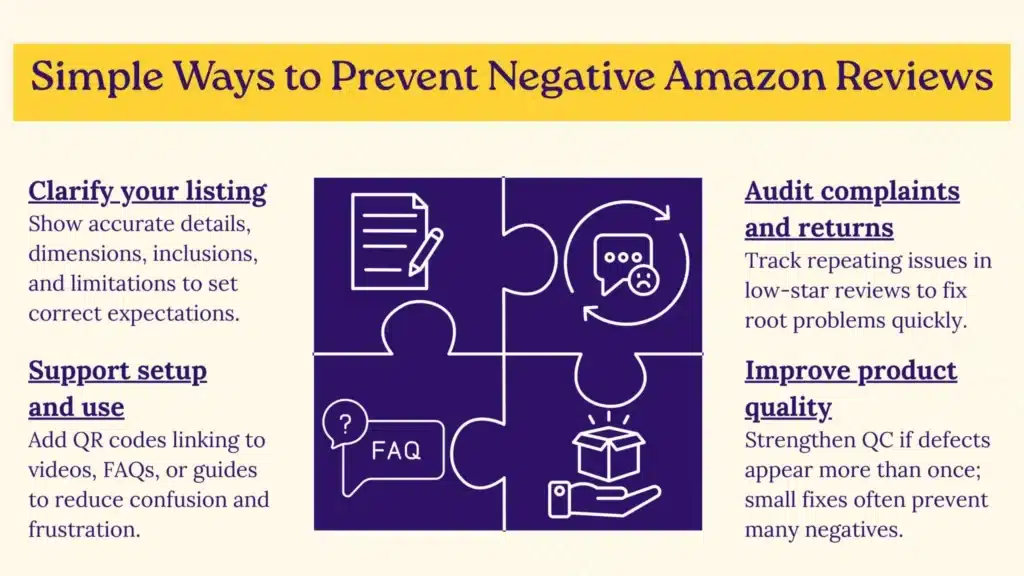
- Upgrade the listing clarity: Show exactly what’s included, dimensions, use cases, and limitations
- Add setup and usage support: Insert a QR code that links to a setup video, FAQ, or troubleshooting page
- Audit returns and top complaints: Look for the same phrases repeating in low-star reviews
- Strengthen quality control: If defects are mentioned more than once, go back to your manufacturer or your operations and work on improving production.
Most negative reviews don’t come from “bad products.” They come from mismatched expectations like unclear sizing, difficult setup without guidance, or misleading images. Fix those, and review sentiment improves naturally.
Are All Negative Reviews Bad?
Many businesses would prefer that their reviews are 5-stars across the board. But surprisingly, a few negative reviews are actually okay. They increase trust because they make your overall review profile look real. If a product has a perfect score, skeptical shoppers may think this listing is too good to be true.
More importantly, negative reviews often reveal what your listing failed to explain or what your product needs next. When you treat negatives as feedback loops, you improve the product, reduce returns, and raise long-term ratings.
Can You Ask Customers To Leave Amazon Reviews?
You can absolutely ask customers to leave a review, and you should. Many buyers are happy with their purchase, but never think to write anything unless you prompt them.
The key to getting Amazon reviews is doing it the compliant way:
- You can ask for a review (neutral request).
- You cannot ask for a positive review, a specific star rating, or “only if you’re happy.”
- You can’t offer incentives (discounts, refunds, free products, gifts) in exchange for reviews.
- You shouldn’t pressure customers or repeatedly message them.
Inside Seller Central, Amazon’s Request a Review button sends a standardized message that asks for both product review and seller feedback. Because it’s Amazon’s own template, it’s one of the safest ways to build review volume without crossing policy lines.
You can also include a short, neutral review request in places like:
- Post-purchase emails (within Amazon’s messaging rules)
- Package inserts (kept simple, polite, and non-incentivized)
Not sure where to start? Here’s a simple template you can use:
“Thanks for your purchase! If you have a moment, we’d appreciate an honest review of your experience; it helps other customers and helps us improve.”
That’s it. Keep it polite, neutral, and focused on honesty instead of “five stars.”
In Summary
No one wants to get negative reviews, and they can’t always be removed. But when you do get them, you can remove the ones that violate policy and fix product issues that trigger repeat complaints. Build a compliant review request and removal system to protect your momentum and increase your conversion rate without risking your account.
You can also optimize your products to be the best they can be when listing them on Amazon. With Trellis, we make selling on this platform straightforward, whether you are just starting out or are looking to grow your storefront to new heights. Our Amazon software tools leverage advertising, dynamic pricing, and more to take your business, and reviews, to the next level.
Connect with Trellis today.
This article was written by TraceFuse, a partner with Trellis. With more than 16,000 negative Amazon reviews removed, they are the only AI-driven solution that detects negative reviews outside Amazon’s policies and guidelines.