












We review your ads, targeting, and revenue signals to spot missed opportunities. Request Your Audit
New Logo. Logo 2026
  • Platform
        • Features

          • Product Advertising

            Benefit from smart, AI-powered ad scaling for your listings.

          • Dynamic Pricing

            Set automated pricing using the power of machine learning.

          • Product Content Optimization

            Let our algorithm generate SEO-rich content for you.

          • Product Promotion

            Harness cutting-edge software to drive higher conversions.

          • Market Intelligence

            Gain access to game-changing data and dashboards.

          • TikTok Reach

            Put your creator partnerships on autopilot.

        • Marketplaces

          • Amazon

            Sell more on the world's largest eCommerce marketplace.

          • Walmart

            Optimize your listings with the world's largest retailer.

        • Dynamic Pricing
        • PPC Advertising Software – features
        • Product Content Optimization
        • Market Intelligence
        • Struggling to Price Your Product? Try our Free Amazon Pricing Elasticity Calculator Now! 
  • Services
    • Agencies
    • Strategic Management
    • Self-Service
  • Pricing
  • Resources
    • Free Tools
    • Blog
    • Case Studies
    • Free Extension
    • eBooks
    • Product Tours
  • Company
    • About Us
    • Contact Us
    • Partner Directory
Schedule A Demo
Sign In
Book A Demo
Sign In
Schedule A Demo
Sign In

Amazon SEO Articles

Discover all the tactics needed to rank higher on Amazon through SEO.

Amazon Backend Keywords: Secrets to Organic Growth
Product Content

Amazon Backend Keywords: Secrets to Organic Growth

Most Amazon sellers incorrectly assume that keyword-rich titles, product descriptions, and

Geoffrey Martlin April 25, 2023
Launching a product on Amazon successfully is challenging, especially in today’s uncertain market. According to Marketplace Pulse, Amazon has around 6.3 million total sellers, with over 2 million active sellers last year. Thousands of products are launched every day, leading to fierce competition. Surviving in such a competitive market with changing trends and dynamics requires strategy and adapting. A successful launch also requires a process. It is not always a matter of listing your product, but how you launch and persistently market the product. If you are new to Amazon selling or have already been selling on Amazon, you will find out what strategies will work in 2023 for a product launch. Product Research The first step is evaluating the product, the target market, and the competitors. It is crucial to do product research and validate the product before launching one. Product research means analyzing the fundamentals of the product such as market demand, profitability, suppliers, delivery, and the target audience. No matter what type of seller you are, private label, dropshipper, or retail arbitrage, product research validates the chances of the product being a success. Even the most advanced sellers understand the importance of product research and spend time, money, and resources in identifying one. Here are so important aspects to focus on when doing a product research Determine Cost & Profit Price factors heavily into Amazon product ranking and in some cases, winning the buy box. While you don't always want to be the cheapest retailer, you should provide the highest value in the product to still earn profits. Determining your competitors' prices and identifying potential ACoS can be a good start to understanding if the product will be profitable in the future. However, there are various pricing strategies to execute depending on the product type. You can start to determine your pricing by understanding your manufacturing and sourcing cost. Product Sourcing Product sourcing and related supplier logistics have also become a huge factor since the pandemic. Sometimes access to the best supplier with a high-quality product can be the key differentiator for a successful product launch. Some common methods of sourcing products for Amazon include Alibaba.com, dropshipping, auctions, online arbitrage, and various marketplaces. However, if you already working with suppliers, manufactuers, or sell in a particular category, yo can utilize the relationship to create more creative products to stand out from the competition. If you sell trending products, then your research phase neeeds to be quicker to get ahead of the market. The top-selling categories on Amazon are dynamic and will change with the seasons and trends. You can get more ideas for your new products or existing ones through keyword research. Keyword Research Using keywords that resonate with your products is essential to increase the ranking and sales on Amazon. You can use keyword research tools to search specific keywords you want. Usually, there are two goals of keyword research; understanding the competition and the volume of searches. By using both, you can understand if the keyword is too saturated. Try our listing analyzer to see what keywords you should be using. Content Optimization Once you know what products and keywords to focus on, you can start your product listing which includes the SEO factors, A+ Content, and the brand story. SEO: Title, Bullets, and Description The SEO component may not necessarily help with the initial launch, but an optimized product listing sets up the product for long-term success and better organic ranking. The product name or title is a critical measure of relevance for Amazon and search engines. It should match the physical packaging of the product and grab customers' attention. Check the Amazon product title requirements and follow the criteria to avoid missing out on the best practices that can lead to search suppressions. Bullet points also contribute to the visibility of the product. Use your keywords in the bullet points to improve the chances of ranking higher. Additionally, descriptions should have detailed information about the features and usage to enable customers to identify, evaluate, and purchase the products. It is here that you should highlight the specific product information that does not appear anywhere in the listing. Product Images + Video Adding images and videos of your product in your listing improves your customer experience and will surely increase the overall conversion rate. Images and videos allow you to display information in a more visual way. The customers will discover the benefits and features faster and more interactively. For videos, you can add a compelling call to action at the end to encourage the viewer's purchase after completing the Video. Try out Trellis’ built-in video maker and create product videos within minutes. A+ Content Using Amazon A+ Content (formerly Enhanced Brand Content) is the perk sellers enjoy after signing up for the Amazon Brand Registry. It enables you to tell your brand story with enhanced images, product comparisons, infographics, and more visual ways to display features and benefits. A+ Content can increase your conversion rate anywhere from 10% to 200%. Marketing Once you have an SEO-optimized product listing with A+ Content, marketing becomes more cost-effective. Especially when you use the right marketing strategies. Some of these strategies include: Promotions Instead of sitting and waiting you can launch your product with the Amazon Promotions feature to push your products, increase reviews, and generate early sales. This includes the use of coupons, deals, discounts, and more. Promotions can be especially effective in combination with Amazon advertising. PPC Amazon Ads can boost your product visibility, get quick traffic, and help you rank higher organically. Improving your ranking takes time but sending traffic to products speeds up that process by helping Amazon see the value your product brings to its customers. Even if you have a newly launched brand, Amazon PPC campaigns are the best bet to ensure both product and brand visibility. If you don’t know how to create Amazon Ad campaigns manually, then try auto-campaigns. They can help you create campaigns quickly using bidding strategies and top-performing keywords. If you are a more advanced seller that wants to take market share away from your competitors you may want to automate your Amazon PPC. Social Buzz Outside the Amazon ecosystem, social media is another great tool to promote your Amazon products. Consumers constantly share information, reviews, ideas, and questions about eCommerce products looking for social proof. To create a buzz about your product, you can use social media influencers to send traffic to your products. Amazon also offers an Amazon affiliate program to motivate influencers to make a percentage on every product sale. Analyze The Amazon product launch strategy does not stop after promoting your product. The ranking doesn't hold forever, and your traffic stream from other channels will drop with time. It is best to continue analyzing your product performance to keep taking steps towards making sales and growing the business. A/B Testing After launching the product and all the marketing campaigns, your click-through rate and conversion rate can help you identify what to improve on. Through A/B testing, you can check what target keywords and ASINs performed well. Advertising automation can help you analyze and optimize campaigns faster. Whereas for the overall listing, you can evaluate the title, main image, and pricing through click-through rate. As you improve the appeal of your listing you can increase your conversion rate by adjusting your A+Content and increasing reviews. Reviews Making sales is not enough when selling on Amazon. You need to make sure to collect reviews along the way. More positive reviews will potentially increase the conversion rate giving consumers a sense of trust. If you get negative reviews, make sure you acknowledge, and accommodate with better customer service. Poor reviews can also help you understand the areas you need to improve upon. Therefore, striving for positive product listing is going to be an ongoing journey. Consequently, better reviews can help you with a more cost effective PPC campaign and likely do better than one with fewer positive reviews. Inventory Managing inventory and analyzing sales velocity is something many sellers struggle with, especially after the pandemic and uncertain supply chains. Always estimate your sales and prepare to restock your inventory ahead of time to avoid delays. While it is common to feel tempted to wait until the last minute, you risk running out of inventory before replenishing. An effective inventory management can help mitigate the risk of running out of stock and negatively impact your product rankings and sales. If you want to maximize your profits while on low inventory, learn how Dynamic Pricing works. Wrapping Up All the above steps in the Amazon product launch guide should help you launch successfully, rank higher, and generate more sales. Thorough product research will save you money in launching the right product. A well-optimized product listing will convert traffic better and set it up for long-term success. Marketing products through various channels can send relevant traffic with purchase intent. And, analyzing the results through testing and optimizing can make the product launch a continued success. For products that you have already successfully launched try growing them with the Amazon Flywheel. If you want to launch your product using automation, Trellis can help you create Amazon Ad campaigns and optimize for growth. Book a demo with us today to get started.
Amazon SEO

How To Launch A New Product On Amazon: Ultimate Guide

Launching a new product on Amazon successfully is challenging, especially in

Geoffrey Martlin December 15, 2022
How Amazon Hub Counter Can Get More Traffic, Sales, & Brand Visibility?
Amazon Fulfillment

How Amazon Hub Counter Increases Traffic & Sales?

As a local retail outlet, you always need more traffic coming

Fahim Sheikh December 14, 2022
How to Get Ungated on Amazon Categories in 2023?
Amazon SEO

How to Get Ungated on Amazon Categories in 2023?

Are you frustrated by the restricted categories on Amazon that limit

Krishna Vemulapali April 20, 2022
Amazon SEO

Amazon FBA Seller Individual vs. Professional Plans

We’ve covered the beginner essentials of being a FBA seller, but one

Denis Leclair April 7, 2022
Amazon SEO

How Video Content Can Help You Drive Traffic To Amazon

Amazon is now the second most popular search engine in the

Fahim Sheikh February 28, 2022
Advanced PPC Strategy

What are Amazon Negative Keywords?

Increasing conversion rates and return on ad spend (RoAS) on Amazon

Denis Leclair January 19, 2022
Amazon SEO

How to Find Profitable Keywords for Amazon Ads

As an Amazon seller, you have a lot of things on

Fahim Sheikh January 11, 2022
Product Content

Amazon Product Video: The One-Stop Guide

The perfect Amazon listing consists of several components – from product images, feature bullets,

Fahim Sheikh November 8, 2021
Amazon SEO

How to Drive Conversions with Amazon Attribution

If you’re selling on Amazon, chances are that you’ve faced the

Fahim Sheikh November 4, 2021
Page1 … Page3 Page4 Page5 Page6

Frequently asked question

What is Amazon SEO?

Amazon SEO (Search Engine Optimization) is the process of optimizing product listings on Amazon to improve their visibility and rankings in search results. Just like traditional SEO, Amazon SEO involves optimizing various elements such as product titles, descriptions, keywords, and images to enhance discoverability and attract more potential customers to your products.

Do I need Amazon SEO?

Absolutely! Amazon SEO is crucial for increasing your product's visibility and driving organic traffic to your listings. With millions of products available on Amazon, optimizing your listings helps ensure your products stand out amidst the competition. By implementing effective strategies, you can improve your chances of appearing higher in search results and ultimately boost sales.

How do you rank higher on Amazon?

Ranking higher on Amazon involves implementing several key strategies to optimize your product listings:

  • Keyword Optimization: Identify relevant keywords for your products and incorporate these keywords naturally into your content to improve visibility.
  • High-Quality Images: Showcase your product to attract customers and promote a positive shopping experience.
  • Compelling Product Descriptions: Highlight your product's unique selling points to communicate key benefits and features to potential buyers.
  • Optimized Product Titles: Include relevant keywords to significantly impact your search ranking and click-through rates.
  • Positive Customer Reviews: A good quantity of positive reviews is essential for ranking higher on Amazon.

What tools can I use to conduct keyword research for Amazon SEO?

We have several tools available to help you conduct keyword research for Amazon, such as our keyword discovery tool, our Amazon listing analyzer, and our completely free Chrome extension. These tools provide insights into popular search terms, search volume, and competition levels, helping you identify relevant keywords to optimize your listings.

How often should I update my Amazon product listings for SEO purposes?

It's a good practice to regularly monitor and update your Amazon product listings to ensure they remain optimized for search. This includes refining keywords, updating product images, and revising product descriptions based on customer feedback and market trends. Regular updates can help improve your search ranking and maintain competitiveness in the marketplace.

Sell more With Trellis

Book a Demo

The latest from the blog

  • 3 Things to Remember for Amazon Prime Day in 2026

    Amazon Prime Day is just around the corner and it is expected to be bigger and better than ever! As an Amazon seller, you know this means one thing: prime yourself now and ...

  • Trellis VS. Perpetua

    Trellis vs. Perpetua: What’s the Best Amazon Selling Platform in 2026?

    Choosing an Amazon advertising platform is not just a software decision. It shapes how your campaigns are structured, how your costs scale, and how much control you actuall...

EXPLORE ALL ARTICLES

Subscribe for growth tips and tricks straight to your inbox.

Facebook Instagram Linkedin Youtube

Features

  • Product Advertising
  • Dynamic Pricing
  • Product Content Optimization
  • Product Promotion
  • Market Intelligence

Marketplaces

  • Amazon
  • Walmart

Resources

  • Free Tools
  • Blog
  • Case Studies
  • eBooks
  • Training

Get Started

  • Schedule a Demo
  • View Pricing

Company

  • Contact Us
  • Partner Directory
Trellis SOC 2 Type 1

©Trellis Corporation 2026

•  Privacy Policy •  Terms and Conditions

Amazon Backend Keywords: Secrets to Organic Growth

Amazon Backend Keywords: Secrets to Organic Growth

Most Amazon sellers incorrectly assume that keyword-rich titles, product descriptions, and featured bullets are the only primary factors for Amazon SEO. To optimize for organic search, backend keywords are equally essential. By integrating backend keywords, you can significantly boost your organic rank on Amazon and improve your product visibility.

If your organic sales are underperforming on Amazon, you might need to focus on behind-the-scenes keywords. In this blog, we look at why Amazon Backend Keywords are incredibly vital, how to find the right ones, and how to add them to your product listings.

What are Amazon’s backend keywords?

Backend keywords are similar to front-end keywords that define the product through features, attributes, etc. Also known as Amazon Seller Keywords, backend keywords are indexed and used to rank your products.

Despite being hidden in the backend of product listings, these keywords play a vital role in optimizing for organic ranking. If you are running out of space on the front end, you can use the backend fields to enter extra keywords.


22 Rules to Increase Amazon Sales Up to 450%

Find out the proven framework we used to increase Amazon sales by 450%.

Download Free Guide

Why are Amazon backend keywords relevant?

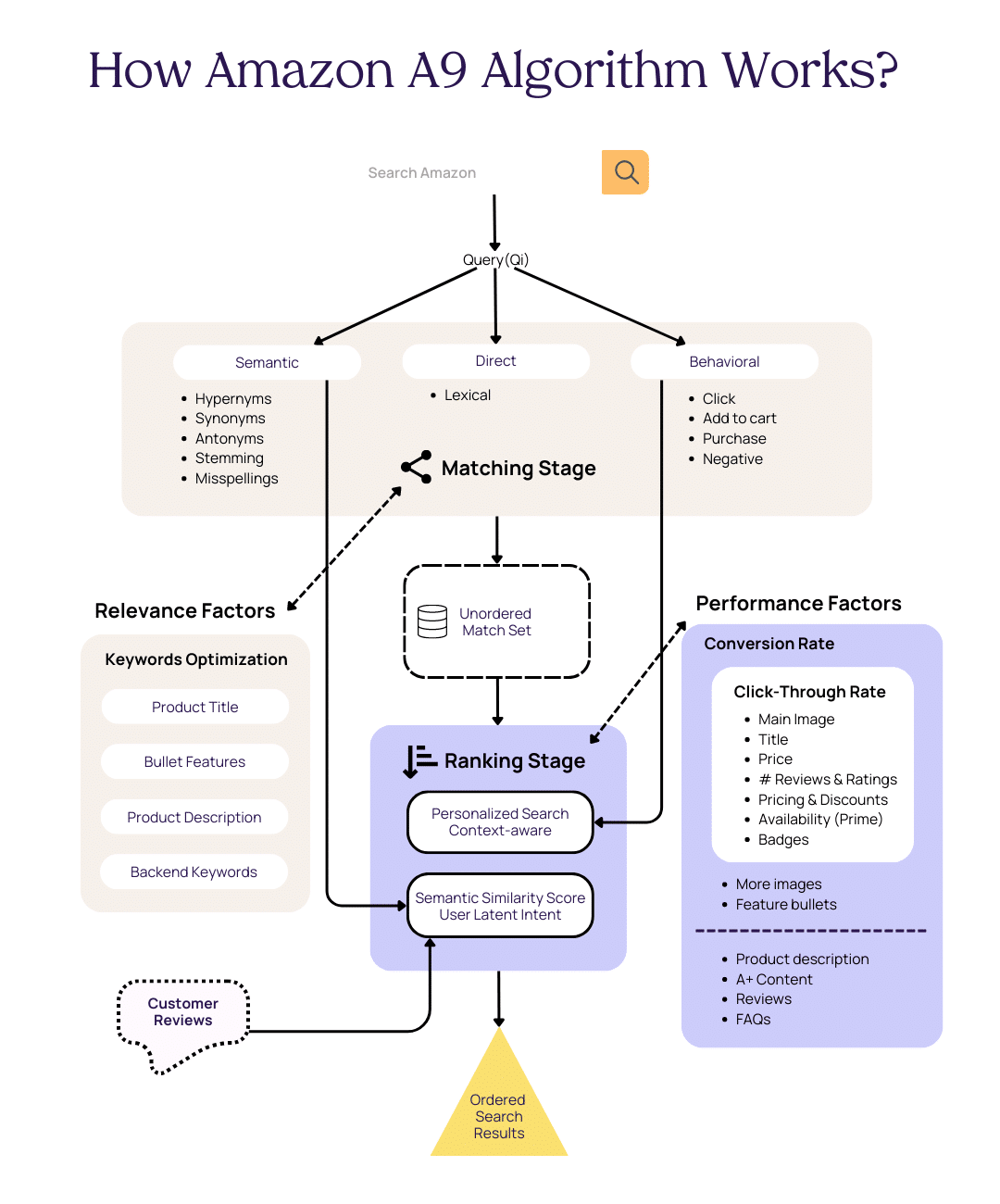
Amazon’s A9 algorithm uses these hidden search terms for organic search results. This allows sellers to avoid keyword stuffing on the front end of the product listing while being discoverable on search at the same time.

Enhanced customer experience

You must have seen several Amazon listings full of keywords that seem unnatural. As a result, customers have an unpleasant experience reading the content. This could have a negative impact on the customer leading to a decline in conversion rates.

Sellers run into a paradox when creating Amazon content. Either they keep it natural and use fewer keywords, or risk hurting the customer experience through keyword stuffing. It used to work with older Amazon algorithms, as more keywords gave a better ranking, but now Amazon has prioritized customer experience through their latest A9 algorithm.

Backend keywords resolve this by allowing sellers to add those extra keywords elsewhere which are indexed and considered for ranking. This way Amazon sellers can keep their content readable and use extra, relevant keywords behind the scenes.

Increasing product discoverability

Focusing more on frontend keywords is not enough to maximize product discoverability. Backend keywords are equally important in optimizing your product listing for organic search results.

Your target audience uses various terms and phrases to find their products. Not getting indexed or ranked for those extra keywords is a lost opportunity. Amazon is already a highly competitive marketplace, and not utilizing all of its SEO opportunities allows competitors to snatch your customers.

Amazon sellers dream of being discovered through organic searches. Getting sales without spending a dime on advertising or promotion is considered a goldmine for sellers. Yet, many brands do not fully optimize their product listings.

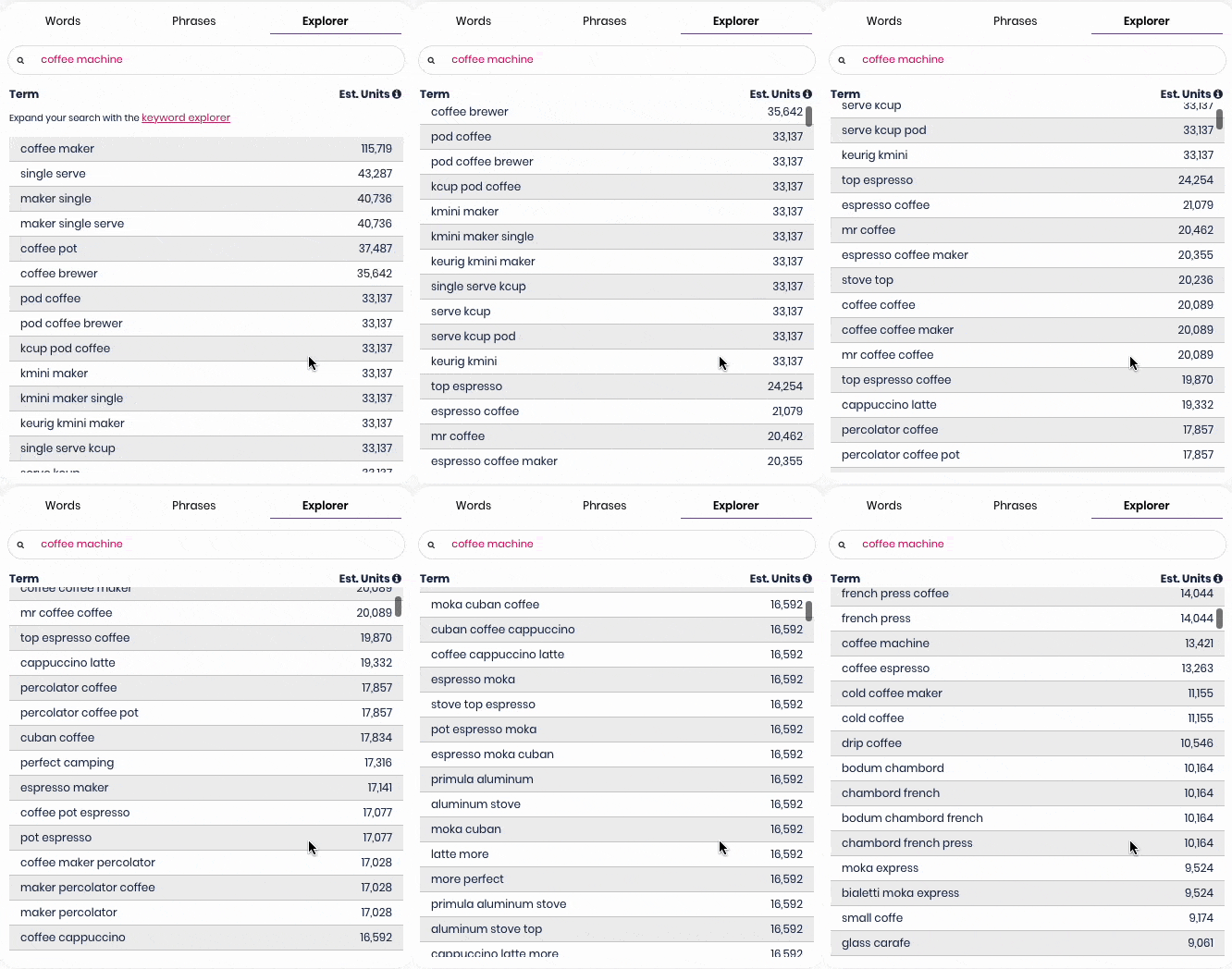
For instance, if you sell coffee machines, you need to browse an extensive list of similar keywords to increase your chances of discoverability.

Trellis Keyword Explorer

How to find the right  backend keywords for your listing?

Knowing your target audience and the terminology they use to find your products is crucial. It is extremely helpful when entering Amazon’s backend search terms. However, it also requires testing to find the right keywords. 

While there are more than a dozen reports on Amazon Seller Central, here are some of the most useful ones for ideating backend keywords:

1. Advertising’s Search Term Report

Advertisers usually use Amazon’s Search Term report generated by brands’ advertising campaigns. This data helps to find high-performing, profitable, and growth-focused keywords to inform their advertising strategy. 

Based on the analyses of the reports, advertisers assign their budget to keywords that will help them achieve their goals, such as greater profits or higher sales. For backend keywords, sellers can use several keywords or phrases that resonate with their product. Brands can get metrics like what keywords brought the most sales, clicks, and impressions.

Advertising's Search Term Report

2. Brand Analytic’s Top Search Term Report

The Brand Analytics tool is one of the most valuable features Amazon has for its sellers with brand registry. This tool provides valuable insights that inform decisions about their product catalog, marketing strategies, and advertising activities. 

Among other reports, the Top Search Term report is the most popular keyword report under the brand analytics tool. It provides a broad view of customer search activity for keywords across the Amazon store. For each search term, you can find the search frequency, top-clicked brands, categories, products, and click-conversion share.

Amazon Search Term Report

3. Brand Analytic’s Search Query Performance Report

Another useful report under brand analytics is the Search Query Performance report. This report provides data for each stage of the Search Funnel for impressions, clicks, add to carts, and purchases. For each stage, it gives brand count and brand share which suggest how well your brand performs against other products on the shelf.

Search Query Performance Brand Analytics Amazon

4. External platforms

While Amazon provides a wide variety of reports, data analysis can be overwhelming. To get the maximum output from siloed reports, they need to be put together to find actionable insights quickly. Trellis’ eCommerce merchandising platform gets data from relevant reports and puts them together to reveal the most important keywords for your product listing optimization and advertising.

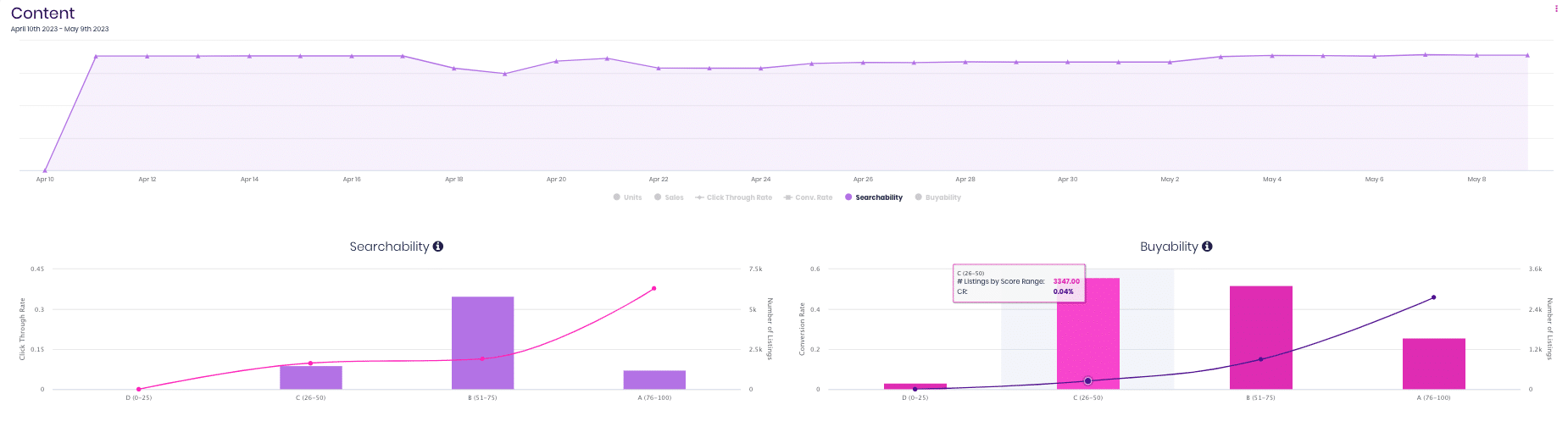
Here is a snapshot of our Content module and keyword explorer:

  • Get keywords ranked grouped and ranked from most converting to least converting,
  • Explore keyword ideas on any keyword sorted by impressions,
  • See real-time keyword utilization and add maximum keywords.

Trellis Content Module

How to avoid duplication of frontend and backend keywords?

Duplicating keywords impact your organic ranking in two ways. One is repetitive keywords on the front end may give a poor reading experience, and on the backend it could be a lost opportunity. To avoid keyword duplication, use software that indicates if you’ve used the keyword before (Trellis Content module), and learn how to add the backend keyword the right way.

How to add backend keywords to Amazon?

Follow the steps below to learn how to add backend keywords to Amazon:

  1. Log in to your Seller Central account
  2. Navigate to the “Inventory Tab” menu > Manage Inventory, which will lead you to your list of products
  3. Click the “Edit” button of the product to access the backend keywords section

Backend keywords

Below is a breakdown of the sections where you can enter the backend keywords.

1. Search terms

In this section, you’ll list the relevant keywords, including all possible options your target customers use when searching for your products. Additionally, include all the product characteristics and features that make it unique. If selling a standing desk, you can use keywords like automated, motored, easy to use, easy to assemble, light-weight, sturdy, with wheels, etc.

2. Target audience

What’s the targeted end-user of your product? List down all your possible target consumers of the product. For example, if you’re selling a standing desk, your target audience can be a long list of people such as students, office workers, designers, artists, and entrepreneurs. If you need more ideas, you can think about their income, gender, profession, and location. It may spur some more ideas such as online traders, work from home parents, healthy individuals, etc.  

3. Subject matter

Most sellers write about the product’s physical appearance. If you are selling a standing desk, you can describe the material, color, height, stylish, modern, etc. Make sure you take advantage of the 250 characters to maximize the space.  

4. Intended use

Amazon wants you to describe the product’s intended use and in what condition or situation customers should use it. With a standing desk example, you can use keywords like health, fitness, energy levels, focus, creativity, etc.

5. Other attributes

Some products have too many specific details which customers might search for to find their products. For such products, “Other Attributes” can be useful. If you sell a standing desk, you can specify the type of wireless charger used in the desk.

6. Amazon Platinum keywords

The Amazon platinum keyword field is available only to platinum sellers to boost their customer experience. Typically, these are merchants with a proven track record and who generate millions of dollars worth of annual sales. Only after a merchant reaches such a milestone does Amazon consider raising their account to platinum. 

How to optimize Amazon’s backend keywords?

The following are tips and rules for optimizing Amazon’s hidden keywords:

  • Combine all the relevant search terms from your research that you couldn’t integrate into the title, bullet points, or product description. 
  • Ensure you prioritize Pay-Per-Click keywords when creating your backend keywords.
  • Use abbreviations and alternate names; online shoppers use the shortest terms to find products online. Instead of typing “Game of Thrones,” they would type GOT
  • Take advantage of complementary keywords. These include companion products purchased with another product. It enables you to reach people who aren’t directly looking for you. For instance, if people search for hand sanitizer, it would be best to also include a face cream. 
  • Ignore prepositions and articles when writing keywords
  • Ensure you separate the words with spaces

The rules of backend keyword optimization

  • Do not exceed the 250 bytes limit for keywords
  • Don’t duplicate keywords in the sections
  • Don’t write keywords as hashtags; space the words.
  • Avoid punctuation.
  • Avoid black hat SEO practices: irrelevant search phrases, spamming, and unethical strategies.

How do I know if a backend keyword is indexed?

After optimizing your backend keywords, you can check if they are indexed. It provides sellers with some assurance that their extra effort to get backend keywords in place has been properly executed.

You can verify if your backend keywords are indexed through a simple Amazon search. In the Amazon search bar, type the ASIN and the backend keyword.

If it is indexed, you will get: ‘1 result for’ the ASIN and keyword. 

If it is not indexed, you will get: “No results for” the ASIN and keyword.

How to track organic ranking after updating backend keywords?

It is important to ensure that your backend keyword strategy is working. You can do this by tracking product rankings. You can either do it through Amazon reports or use tools like Trellis where all product rankings are tracked for organic performance.

Sign-up now to explore and track your product rankings along with a lot more tools to boost your eCommerce merchandising business through one platform. Stay tuned for the Amazon buy box.

22 Rules To Increase Amazon Sales Up To 450%

Find out the proven framework we used to increase Amazon sales by 450%.

Download Free Guide