
Run everything you never had time to implement. Define your process once, and keep it running with Qore.

Qore > Skills > Target Efficiency Analyzerr
Growth & Expansion

Target Efficiency Analyzer

Finds the keywords and ASIN targets that stay efficient across three lookback windows at once, not just one good week. Amazon, US, report only.
Deep
·
7 steps
Amazon
READS
Your ad data
LOOKS FOR
Targets under your ACoS ceiling in 7, 14 and 30 days
PRODUCES
A workbook of qualifying keywords and ASIN targets
YOU
Read it, and decide which bids to move
Overview

What it looks at, what it flags, what comes back, what you can change.

What it looks at
Keywords and ASIN targets, three windows each
  • Keyword performance over 7, 14 and 30 days
  • ASIN and product target performance over the same three windows
  • Each window ending before today, so the data has settled
What it flags
Entities that clear the bar in every window, not one
  • ACoS below the threshold you set, in all three windows
  • Real spend in all three windows, no idle entities
  • Conversions at or above your minimum, per window
What comes back
One workbook, two tabs, ranked
  • A Keywords tab and a Targets tab, with per-window figures
  • Sorted by 30-day ACoS, best performers first
  • A report only, nothing applied to the account
What you can change
Five settings, per run, without editing the skill
  • Marketplace, ACoS threshold, conversion minimum
  • Branded keyword filter, data lag offset
  • Changed on a run without touching the template

Which targets held efficient in all three windows

Keyword + ASIN target reports · sample
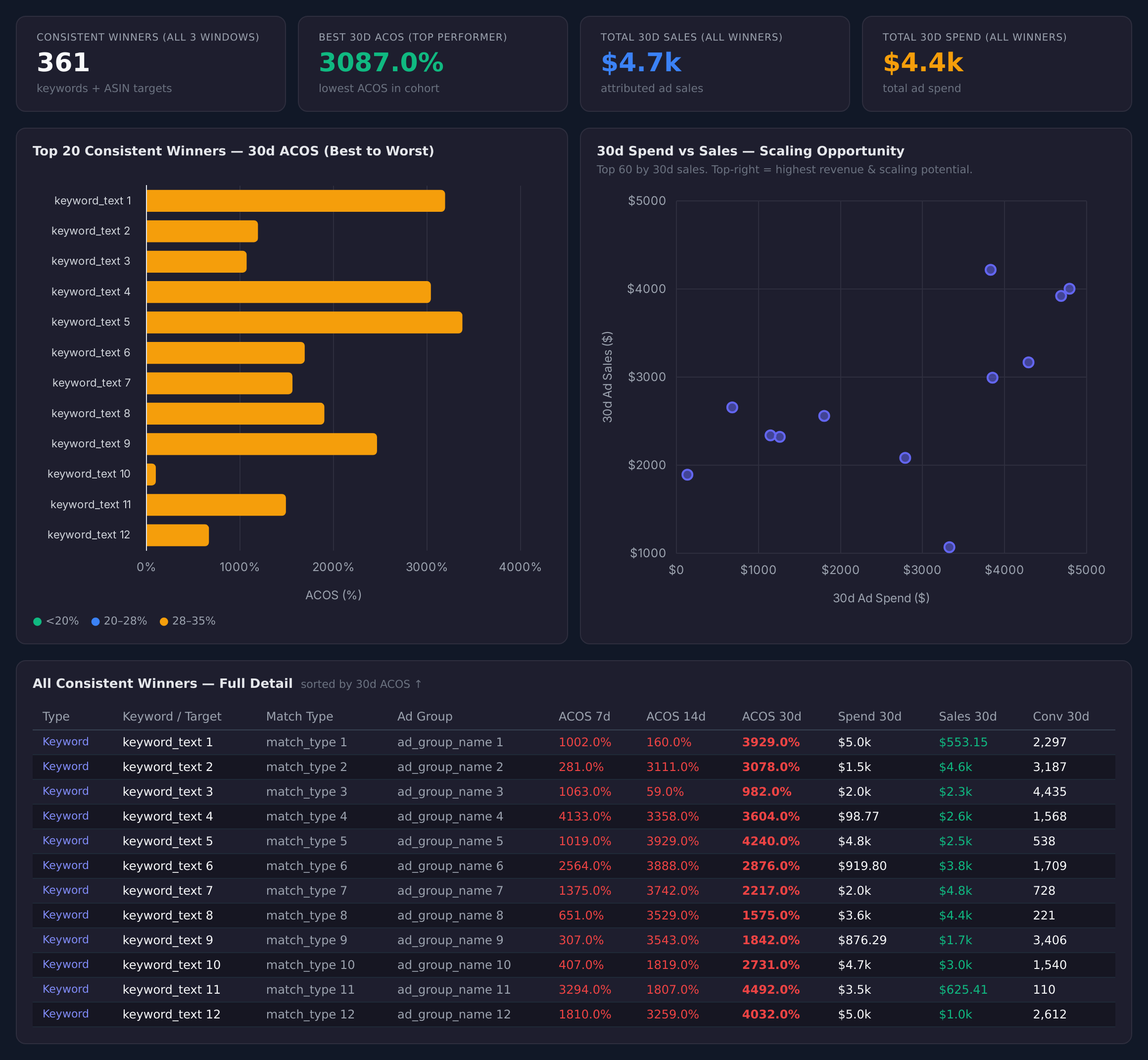
Sample figures. Your own numbers appear the first time the skill runs.

Run Settings
The five things this skill asks you to set.
Marketplace
Which marketplace to analyse. One per run, so results are not mixed across storefronts.
Low ACoS threshold
The ACoS value that counts as low. An entity must sit under it in all three windows to qualify.
Min conversions
The fewest conversions a keyword or target needs to be included. Raise it to cut thin, noisy rows.
Branded keyword filter
The brand term used to exclude branded keywords, so your own name does not flatter the list.
Lookback end offset days
How many days before today each window ends. Move it out when your reporting data settles late.

Frequently Asked Questions

How do I find keywords that are consistently profitable, not just lucky?

This skill reads each keyword over 7, 14 and 30-day windows and keeps only the ones that sat under your ACoS threshold in every window, with real spend and conversions in each. A single good week does not qualify it.

Does this change my bids?

No. It only reports. It hands back a workbook of qualifying keywords and ASIN targets, and you decide which bids to move.

Why does it exclude the most recent days?

Recent advertising data is still settling, so each window ends a set number of days before today. You control that offset with the lookback end offset setting.

Does it cover ASIN targets as well as keywords?

Does it cover ASIN targets as well as keywords?

Why are my branded keywords missing from the results?

Branded terms are excluded using the brand term you set, so the list is not dominated by your own name. Clear or change that setting if you want them in.

Which marketplaces does this work on?

Amazon. You choose the marketplace on each run.

Start
Provisioned on your account at signup.
Try Qore
Use cases
Growth & Expansion
Find keywords worth bidding on

Your auto and broad campaigns are already finding winners. This surfaces the ones worth bidding on before they cool off.

Ads
3 skills
Amazon
Walmart
Planning & Profitability
Decide which products to push

Budget is finite and your catalog is not. This shows which products have room to take more, and which are already maxed.

Ads
3 skills
Amazon
Walmart

Every one of these runs on your own account.

Sign up, connect an account, and install a skill. The first run produces a real result you can look at before you schedule anything.
Try QoreBrowse The Skill Library