



Amazon Automatic Targeting: How Close Match, Loose Match, Substitutes, and Complements Earn Budget

Amazon automatic targeting splits your budget across four groups that behave differently, and one campaign bid treats them as one until you change it. Amazon decides where your Sponsored Products ads show, and the search term report tells you which of its decisions paid off. This guide covers what each group does, what evidence earns it more budget, and how the winners graduate into manual campaigns.
Quick Answer
- What it is: Amazon's Sponsored Products targeting guide lists four automatic targeting groups. Close match and loose match work from search terms. Substitutes and complements work from product detail pages.
- The opportunity: Auto campaigns surface search terms and ASINs you would not have thought to target, and each group can be bid, paused, and judged separately.
- The risk: Loose match and complements can spend on traffic that never converts, and every group wastes money if the search term report goes unread.
- How to judge budget: Read results per group, not per campaign. A campaign average hides the group that is carrying the account and the group that is draining it.
- How winners graduate: Move converting search terms into exact match and converting ASINs into product targeting in a manual campaign, then negate them in the auto campaign.
- Our read: Run auto as a discovery engine with a written graduation rule. Discovery without a rule just produces a report nobody acts on.
Why four groups need four decisions
Most accounts launch an auto campaign, watch one blended ACoS, and judge the whole thing on that number. The blend is the problem. A group that converts well and a group that burns budget average out into a figure that tells you to do nothing.
Operators who look for this topic tend to paste all four group names into one search. That says the real question is how the groups fit together and what each one is for. The answer starts with how Amazon defines them.
The four groups: two read search terms, two read product pages
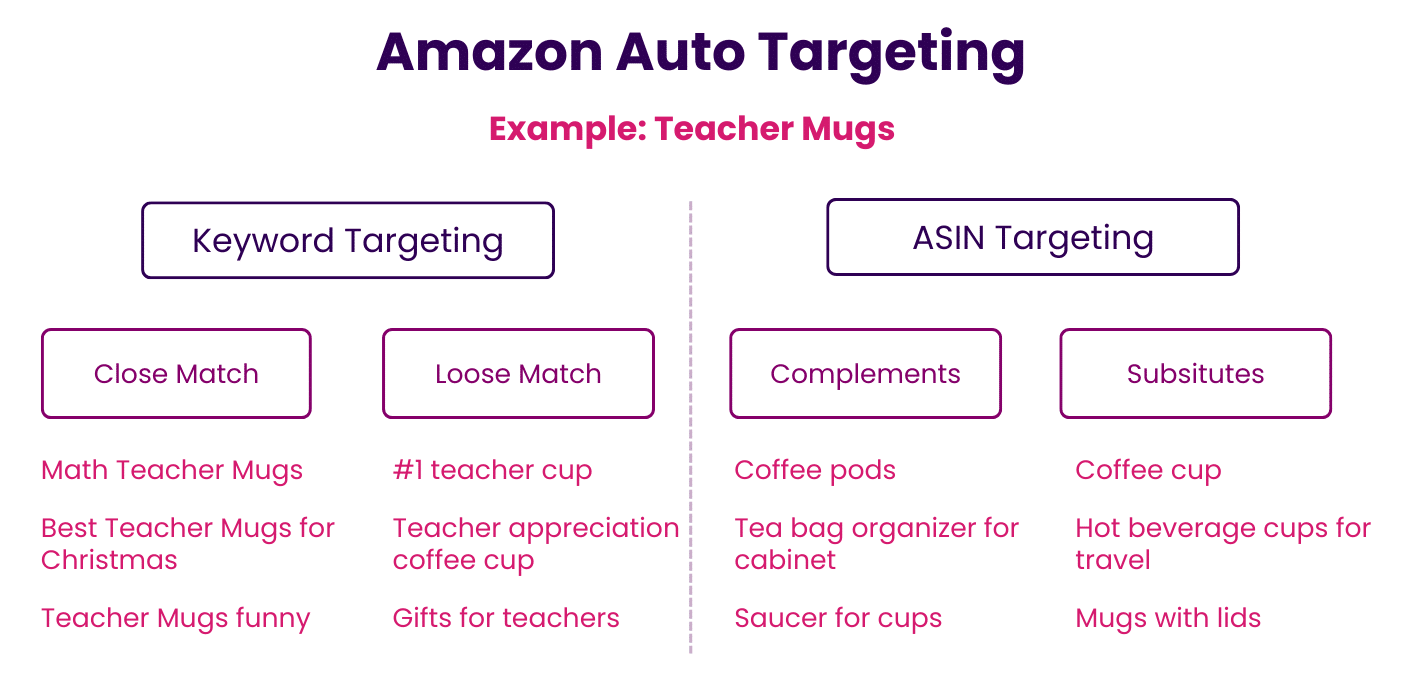
Amazon describes the groups this way: close match shows your ad to shoppers who use search terms closely related to your product, loose match to shoppers using terms loosely related, substitutes to shoppers browsing detail pages of similar products, and complements to shoppers viewing detail pages of products that complement yours.
Close match: the closest thing to your own keyword list
Close match serves ads on search terms that sit near what your listing says. If you sell pet shampoo, expect impressions on queries such as pet shampoo for dogs. Of the four groups, this is where your listing is most likely to meet clear purchase intent, so it is usually the first group to earn a higher bid.
Loose match: discovery with the most noise
Loose match stretches further. A listing for gloves can pick up thermal gloves, winter gloves, and queries that drift further from what you sell. It builds visibility and finds phrasing you had not considered, and it is also the group most likely to produce irrelevant clicks. Judge it on your own search term data.
Substitutes: shoppers already looking at a similar product
Substitutes place your ad on the detail pages of products shoppers might choose instead of yours. A sandal listing can appear on flip-flop pages. For a new entrant, it is a direct route to shoppers who are comparing and have not committed.
Complements: shoppers buying around your product
Complements place your ad on pages of products that go with yours. For a hair dryer, that can mean pages for a wall mount or a case. The shopper is often at a different point in the decision, so conversion can look different from substitutes even when the product is the same.
Each group earns budget on its own evidence
Auto campaigns let you set a bid per group and pause groups you do not want. Use that. The table gives a working frame; replace the judgment words with your own ACoS target and your own click thresholds, because those depend on price point and margin.
| Group | What it reads | Earns more budget when | Cut or restrict when |
|---|---|---|---|
| Close match | Search terms closely related to your product | Orders arrive at or under your target ACoS on enough clicks to trust the number | Spend piles up on terms your listing does not serve, which usually points at the listing, not the group |
| Loose match | Search terms loosely related to your product | The search term report shows converting terms you would not have chosen | Clicks keep arriving with no orders. This is the group most likely to need a lower bid or a pause |
| Substitutes | Detail pages of similar products | Specific ASINs convert, which makes them candidates for product targeting | Your price or reviews lose the comparison on every page, so extra bid only buys more losing clicks |
| Complements | Detail pages of products that pair with yours | Add-on or bundle behavior shows up in orders | Impressions rise and orders do not. The match may be real while the purchase intent is not |
Two cautions on reading this. First, a group with few clicks tells you little, so wait for enough data before cutting. Second, the cut column is only evidence that something is wrong. Check the listing, price, and reviews before blaming the group.
How winners graduate from auto to manual campaigns
Amazon's own guidance is to use the automatic campaign search term report to find the keywords and products worth a manual campaign. The steps below turn that advice into a routine.
- Pull the search term report for the auto campaign over a window long enough to cover your normal sales cycle. The search terms report guide covers the columns.
- Sort by orders. Mark search terms and ASINs that converted at or under your target ACoS. The ACoS guide covers how to set that target.
- Promote keyword winners. Add converting search terms to a manual campaign, usually as exact match. The match type guide explains why exact is the common starting point.
- Promote product winners. Add converting ASINs to a product targeting campaign so you set the bid on that page yourself.
- Negate what you promoted and what failed. Add promoted terms as negative exact in the auto campaign so it stops competing with your manual campaign, and add wasteful terms as negatives as well. The negative keywords guide covers exact versus phrase. Amazon confirms negative targeting works in automatic campaigns.
- Repeat on a schedule. New terms keep arriving, so the review never finishes.
Keep a clean split between discovery and performance campaigns, as described in the campaign structure guide, so you can tell which campaign produced which result. The manual versus automatic guide covers the broader choice.
When to use automatic targeting
Auto earns its place when you need data, speed, or reach.
- New product launch: you have no keyword history, and auto generates early impressions, clicks, and sales signals.
- Keyword discovery: it finds long-tail queries and ASINs that a hand-built list misses.
- Category entry or new variations: it tests demand without a full keyword list built first.
- Support for manual campaigns: it fills gaps and keeps feeding the report.
Mistakes that drain auto campaigns
- Leaving it unattended. Without regular review, spend drifts toward whatever the group finds easy to buy.
- Skipping the search term report. The report is the product of an auto campaign. Without it you have paid for discovery and thrown away the result.
- Skipping negatives. Irrelevant terms keep collecting clicks until someone blocks them.
- Running auto only. You give up control of bids on individual keywords. The bidding strategies guide covers how to regain it.
- Weak listings. Amazon matches from your title, bullets, and content. A thin listing produces thin matching.
- One bid for four groups. Default bids rarely suit every group, which is why the per-group read above matters.
Step six is where the weekly routine breaks
Steps one through five take an afternoon. Step six is the one that fails in practice. A review done by hand across many campaigns slips by a week, then a month, and the promoted winners and the unblocked waste both go stale.
Qore from Trellis is where you turn a review you do by hand into a workflow that runs itself. You describe the graduation rule once, such as which orders and ACoS qualify a term for promotion and which spend qualifies it for a negative, and Qore runs that rule on your data on a schedule. Q, the assistant inside Qore, helps you shape the rule. Actions default to manual approval, so you see what it proposes before it changes anything, and autonomy is available once you trust the rule. Qore is in open beta, and you can sign up here.
Qinetix, our platform for ads automation, handles the execution side: harvesting converting terms from auto campaigns, negating waste, and promoting winners at volume inside the guardrails you set. Its fee is a flat amount set at onboarding based on scale, so it does not rise as your spend grows.
The limit: auto campaigns discover terms. Neither Qore nor Qinetix decides which terms deserve a dedicated campaign. That judgment, and the thresholds behind it, stay with you. The software applies your rule consistently, which is the part people skip when the week gets busy.
Run auto as discovery with a written graduation rule
Treat the four groups as four separate bets. Fund close match on evidence, restrict loose match and complements until the data earns them more, and move substitutes winners into product targeting. Then write down when a term graduates and when it gets negated, and run that rule on a schedule. If you want to see what that looks like on your account, book a walkthrough.
Frequently Asked Questions
Amazon automatic targeting is a Sponsored Products option where Amazon chooses the search terms and product pages for your ads based on your listing and shopper behavior. You choose the budget and bids, and Amazon chooses the placements.
Close match, loose match, substitutes, and complements. Close match and loose match target search terms. Substitutes and complements target shoppers on product detail pages.
Yes. Auto campaigns let you bid per targeting group and turn groups off, so each group can be funded on its own results.
Start with the group that gives you the cleanest data. Many operators begin with close match because its terms sit closest to the listing, then widen once the search term report shows what converts.
Find the converting term in the auto campaign's search term report, add it to a manual campaign as exact match, and add it as a negative exact in the auto campaign so the two do not compete.
Yes. It is a practical way to gather early impressions and sales signals before you have keyword data. Plan to review the report and graduate winners once enough data arrives.
Yes, for most accounts. Auto finds terms and products, and manual campaigns give you control over bids and targeting on what you already know converts.
On a fixed schedule that fits your sales cycle. The point is consistency, because a review that slips lets waste accumulate and winners go unpromoted.