



Run everything you never have time for.
Qore is wired into your marketplaces, so an answer can become an action: a bid changed, a report built, a check that reruns every Monday. Nothing touches your accounts without your approval.
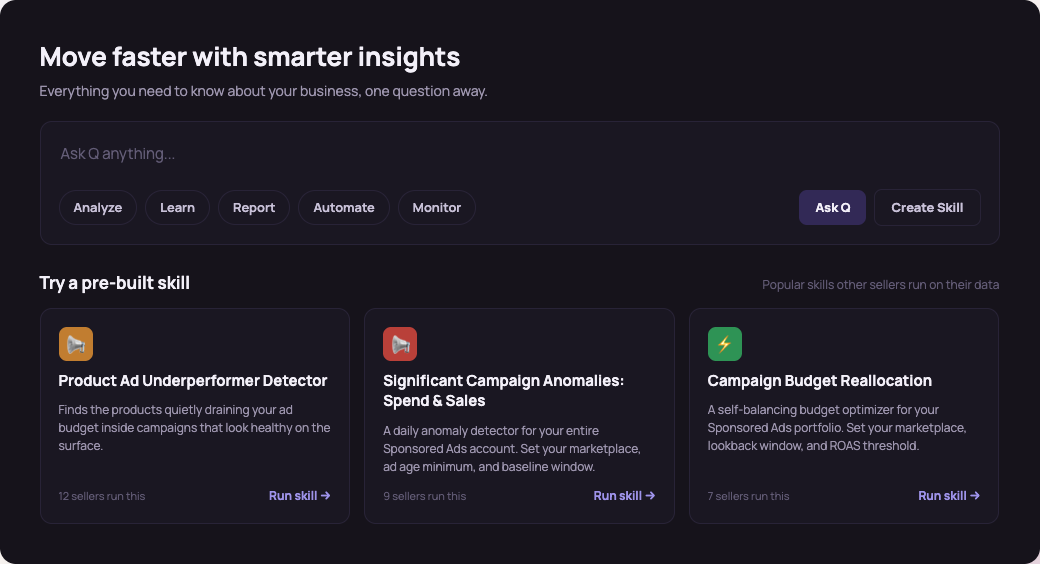
Where to start
Come with a problem, a process, or nothing but a hunch. Qore meets you at any of them.
Something is off and you want to know why.
Ask Q and chase the answer until it turns into a change worth making. When the answer is right, keep it as a skill.
- A dip you can’t place on one account.
- Spend up, sales flat, and no obvious culprit.
- A competitor showing up on your branded terms.
You know what should run.
Codify it, put it on a schedule, and point it at every account it applies to.
- Codify the SOP you run by hand today.
- Start from a templated skill and tune the thresholds.
- Rebuild the Monday report so it builds itself.
Knowing what to do was never the hard part.
The SOP exists in someone’s head.
Everyone knows what a well-run account looks like; nobody has the hours to run it that way every week.
Performance pays for the time you don’t have.
The negatives, placement trims, and pacing checks move the numbers, and they’re the first things dropped.
A new chat every time, and nothing to build on.
Reasoning you can’t audit, answers that drift, and last week’s work gone when the chat ends.
The stack is a second job.
MCPs, integrations, and automations are real work to build and keep running.
Four pains, one root cause: the way you’d run the account has nowhere to live, so it doesn’t run without you.
What the week looks like once it runs.
- Mon
The report is waiting when you sit down. It ran overnight.
- Tue
A pacing skill flags a campaign overspending the morning it starts.
- Wed
The client call ends, and the action items are already in Tasks with owners.
- Thu
Leadership asks how a budget shift got decided. You send the trace.
- Fri
The lead is on PTO. Every skill runs anyway.
One system, five surfaces.
One system holds it all: the question you ask Monday becomes the skill that runs Tuesday, feeds the report you send Friday, and leaves a trail your whole team can read.
Ask it what's going on.
Q is Qore’s assistant: aware of your connected marketplaces, integrations, and platforms, and trained on eCommerce work. With the skill builder, report builder, and action log behind it, a question can end in output, not just an answer.
Watch your system get built.
Skills are built in the open: the connectors, the data each steps reads, and the path to the outcome. Auditable when a client asks, and versioned so the logic doesn't drift.
Build on last week, not from scratch.
Consistent reports for the stakeholders who need them, in the same system as everything else, so the numbers carry the actions you've taken and the ones queued next.
No blind spots in the numbers.
Query Amazon Marketing Cloud's granular signals and fold them into the same reports, so path-to-purchase questions get answered next to everything else.
The week's list, drawn from everything.
Pulls what came out of Q, your reports, and your calls into one working list: the automated actions to approve and the manual ones to do, so the account keeps moving.
An assistant with a schedule, a memory, and a paper trail.
- vs. chat tools
They think every time you ask. Qore thinks once, then runs it.
A chat gives you an answer and forgets it. A skill keeps the logic, the schedule, and the history, so the second week starts where the first one ended.
- vs. rules automation
A rule fires on one condition. A skill runs your judgment.
If-this-then-that can’t hold a tradeoff. Skills carry the thresholds, the exceptions, and the reading of the numbers your best operator would apply.
- vs. building it yourself
The components come included.
MCPs, integrations, connectors, and templated skills are already built and maintained, so the work starts at your process, not at the plumbing.
You decide when it acts.
Every action Qore proposes lands in a queue with the reasoning attached. Approve the batch, approve one, or don’t.
The approval gate
Nothing reaches market unapproved. Actions default to your sign-off, and you tune which ones earn the right to run on their own.
The inspect view
Every step, the data it read, and the counts at each stage. A junior can learn from it; a client can be shown it.
Guardrails and run settings
Spend floors, lookback windows, exempt campaigns, match types. Your standards, written down once.
What operators run it for.
Each of these is a live use case with the skills behind it. Open one to see the check, the output, and the move it stages.
Find wasted spend
Some of your spend goes to targets that never convert. You find it when you have an afternoon, which is not most afternoons.
Catch performance breaks early
Something drops on a Tuesday and you notice on Friday. By then the rank has moved too.
Defend your branded terms
Competitors bid on your brand, your defense CPC climbs, and you find out when the invoice does.
Stop paying for a lost buy box
Losing the Buy Box doesn't stop your ads, it just sends the clicks to a rival. This pulls the spend until you win it back.
Stop building the same report
Every recurring report you build by hand is time you spend the same way each week. This runs it for you.
Keep spend in line with stock
Ads keep spending while a product runs out, then keep paying after it is gone. This keeps spend and stock in step.
The skills look as closely as you would.
A skill is one granular check on your own account, encoded, scheduled, and versioned. A few from the library:
- Wasted Spend Analyzer
- Keyword Gap Finder
- Branded Share of Voice
- Search Term Harvester
- Duplicate Keyword Finder
- Impression Anomalies
- Buy Box Win-Rate Drop
- Low-Stock Ad Throttle
- Placement Bleed
- Monthly Performance Rollup
- Ad Sales Ratio
- Competitor Conquest Alert
- PO Price Discrepancy
- A+ Content Gap
- Restock Ad Resume
- Out-of-stock Ad Pause
- Rising Search Terms
- Zero-Conversion ASINs
- Client-Ready Deck
- Match-Type Cannibalization
- New-to-brand Trend
- Listing Content Auditor
- Scheduled Report Runner
Built for how you run the week.
Pick the row that sounds like yours.
Priced by what you schedule.
Plans are sized by what runs on a schedule: cadence, connectors, and accounts.
One account, the starter skills, weekly cadence.
More scheduled skills, more connectors, daily cadence.
Cross-account roll-up, team sharing, your own MCP servers.
Scheduled runs are the unit.
Build as many skills as you like; cadence, connectors, and accounts size the plan.
Questions answered.
What is Qore?
Qore is Trellis’ workflow layer for ecommerce teams: Q, an assistant that answers questions across your connected accounts; a skill builder that turns the answers into scheduled checks; and an approval queue that gates every action before it reaches market. It is in open beta.
Is Qore replacing my team?
No. Qore extends your team. It runs the checks, analysis, and recommendations that currently depend on manual effort, while your team keeps the strategy, the logic, the approvals, and the execution settings.
Isn’t this just Claude or ChatGPT pointed at my ad data?
Chat tools answer a question and forget it. Qore keeps the answer: skills run as fixed, versioned steps on a schedule, with the reasoning inspectable and the actions queued for your approval, so the work compounds instead of restarting each chat.
What if the AI gets it wrong?
Every recommendation is reviewable before it runs: you can open the steps, see the data each one read, and see how it reached the conclusion. You set which actions require approval and which have earned the right to run on their own, and nothing executes past a gate you have set.
Can Qore follow our SOPs?
Yes. Teams encode their workflows, thresholds, goals, and escalation rules so Qore runs against their standards. If your SOPs are written down, codify them on day one; if they live in someone’s head, Q helps get them out.
Do I need the Trellis ads platform and Qore, or just one?
Qore can read, analyze, and make approved changes on any account, whatever manages your bids today. Always-on automated bid execution runs on the Trellis Bid Platform (Qinetix), and the two share account data when you run both.
Is my ad data safe?
Qore runs on the accounts you connect, with approval-gated actions. Nothing executes without your sign-off where you have set that gate, and your data stays yours.
What does Qore cost?
Signup is self-serve in the open beta. Plans are sized by what runs on a schedule: cadence, connectors, and accounts. The sandbox runs on demo data if you want to look around before connecting anything.
Which marketplaces and integrations does it cover?
Amazon and Walmart account data, with Amazon Marketing Cloud available for path-to-purchase questions, and output landing where your team already works: Slack, email, and spreadsheets. Coverage grows through the beta.

Start with the check you never get to.
Connect one account, ask Q, and have the first skill running inside the hour. The sandbox runs on demo data if you’d rather look around first.