



Campaign Type Performance Scorecard
What it looks at, what it scores, what comes back, what you can change.
- Advertising performance across Sponsored Products, Brands and Display
- Spend, sales, impressions, clicks and conversions per type
- Amazon, on the marketplace and lookback window you choose
- ACoS and ROAS recomputed from summed spend and sales, never averaged
- Share of total spend against share of total sales
- The gap between the two, per campaign type
- Account totals: spend, ad sales, blended ACoS, blended ROAS
- Ranked ACoS and ROAS bars, spend share against sales share
- A verdict and a budget recommendation on every type
- Marketplace and lookback window
- The ACoS ceiling for earning its budget
- The ACoS ceiling for borderline, above which a type is over-spending
Where the budget sits, and what it returns
Campaign performance by ad type · sample
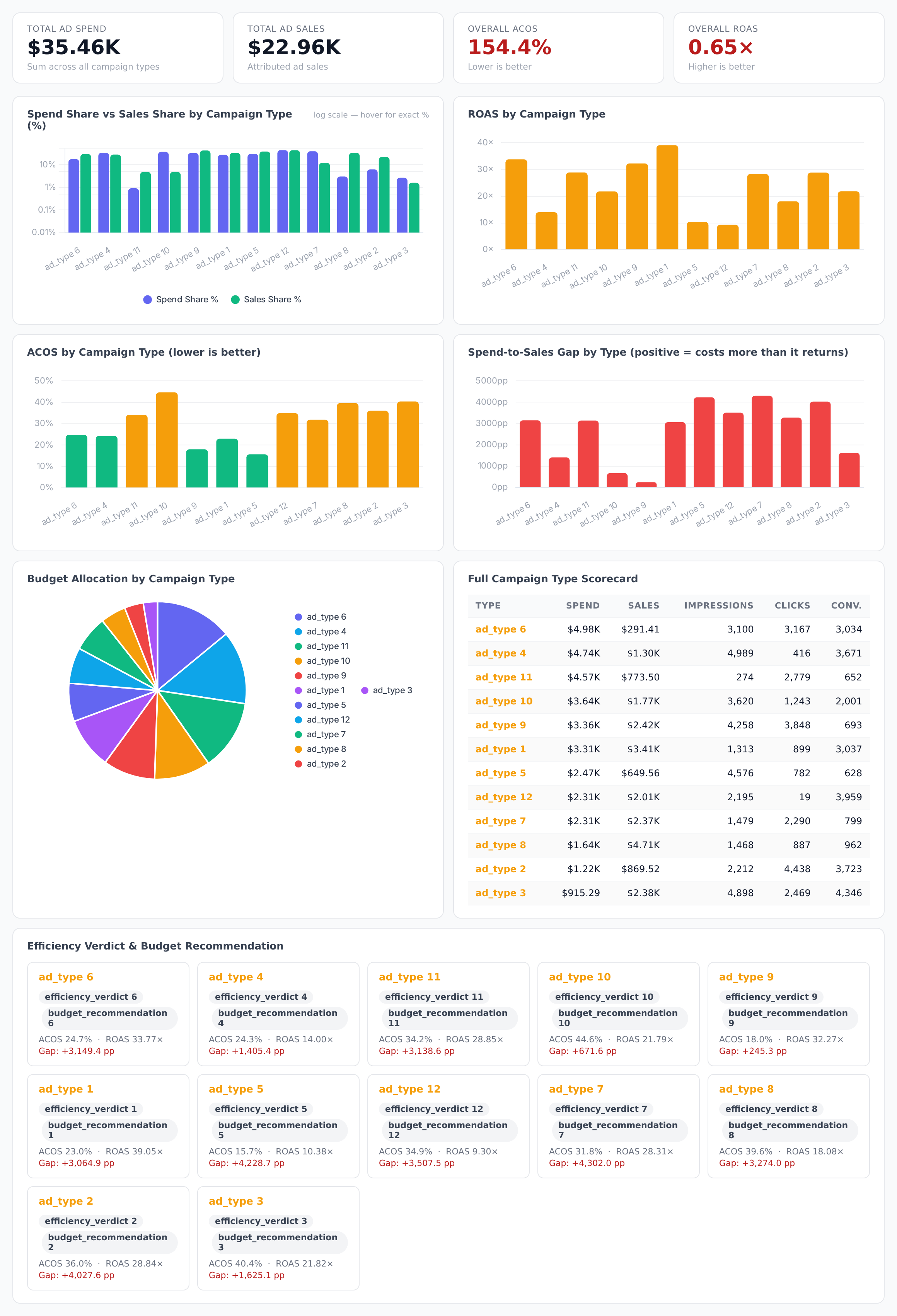
Sample figures. Your own numbers appear the first time the skill runs.
Frequently Asked Questions
The scorecard sets each type's share of total spend against its share of total sales. A type taking more of the budget than it returns in sales shows a positive gap, and is labelled over-spending when its ACoS sits above the borderline ceiling you set.
It collapses individual campaigns into SP, SB and SD buckets and reports spend, sales, impressions, clicks and conversions for each, with ACoS and ROAS recomputed from the summed totals rather than averaged across campaigns.
No. It only reports. Each type comes back with a verdict and a budget recommendation — keep, trim, or reallocate — and you decide what to act on in the account.
Can I set my own ACoS thresholds for the verdicts?
As far back as the lookback window you set. A shorter window gives a current read; a longer one steadies the numbers on lower-traffic accounts where a single week says little.
Every one of these runs on your own account.