
Run everything you never had time to implement. Define your process once, and keep it

running with Qore.
Qore > Skills > Trellis Managed: ACOS and Budget Manager- TACOS Basedr
Ongoing maintenance

Trellis Managed: ACOS and Budget Manager- TACOS Based

Computes rolling TACoS for every active category, back-calculates the ad-level Target ACoS that would hit your goal, and applies it. Daily, with a step cap.
Standard
·
7 steps
Amazon
READS
Your ad data
Your catalog
LOOKS FOR
Categories whose TACoS has drifted past your tolerance
PRODUCES
Target ACoS and budget changes, applied to active ads
YOU
Read the status report, and tune the target
Overview

What it looks at, what it flags, what it changes, what you can change.

What it looks at
Category performance, and every active ad inside it
  • Total sales, ad sales and spend per category, over your lookback
  • Categories with no sales at all, dropped before anything is computed
  • Active advertisements with their budget, current ACoS and target ACoS
What it flags
Categories sitting outside your tolerance band
  • Over Target, when TACoS runs above target by more than your tolerance
  • Under Target, when it runs below by more than your tolerance
  • Pure organic, where a category sells but carries no ad spend
What it changes
Target ACoS and budgets, applied the same day
  • A derived Target ACoS per category, from its ad-to-total sales ratio
  • Budgets down in over-target categories, up in under-target ones
  • A daily step cap on both, so nothing moves far in one run
What you can change
Five settings, per run, without editing the skill
  • Marketplace, lookback days, target TACoS
  • Tolerance band and budget change percentage
  • Changed on a run without touching the template

Where TACoS sits against target, category by category

Category performance + active ads · sample
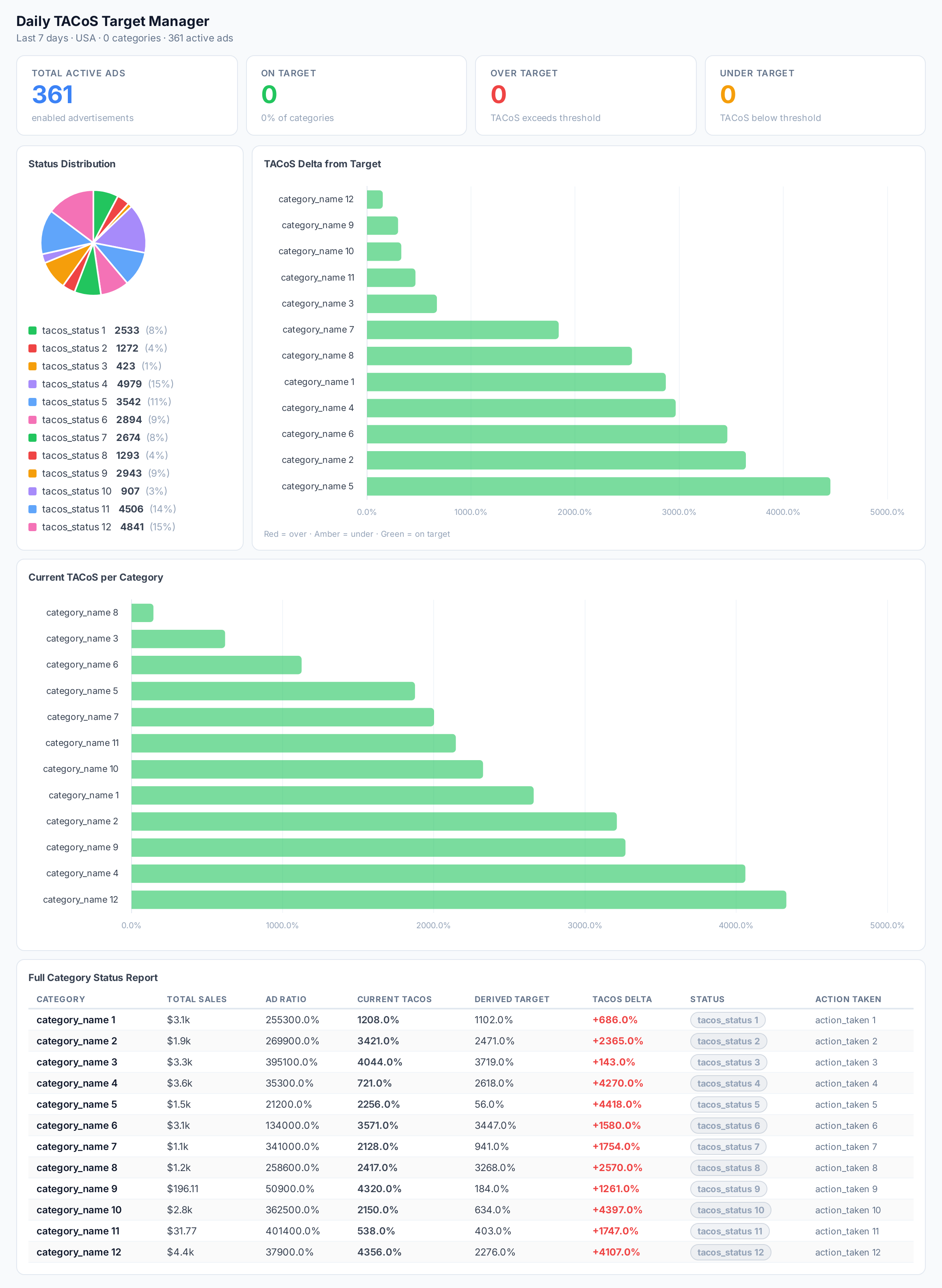
Sample figures. Your own numbers appear the first time the skill runs.

Run Settings
The five things this skill asks you to set.
Marketplace
Which marketplace to analyse. The skill reads and writes only there.
Lookback days
How many days of category and advertisement history to read. Longer on lower-traffic accounts, so the signal is real.
Target TACoS
The TACoS goal every category is steered towards. Set as a decimal. Tighter for margin recovery, looser for growth.
Tacos tolerance
How far a category may sit from target before it counts as Over or Under. Widen it to act less often.
Budget change pct
How far a budget moves when an adjustment triggers. Lower it for a more conservative account.

Frequently Asked Questions

This is some text inside of a div block.

Set a target TACoS and a tolerance band, and the skill computes rolling TACoS per category each day. Categories outside the band get a derived Target ACoS applied to all their active ads, plus a budget adjustment.

What is derived Target ACoS?

It is the ad-level ACoS target implied by your TACoS goal once a category's ad-to-total sales ratio is taken into account. Categories with more organic sales can carry a looser ad-level target and still hit the same TACoS.

Does this skill change my campaigns or just report?

It changes them. It applies the derived Target ACoS to every active advertisement in an off-target category, and updates those daily budgets in the same run.

How do I stop automated bid and budget changes running away?

How do I stop automated bid and budget changes running away?

How do I find categories with sales but no ads?

The skill flags those as Pure Organic and lists them separately in the status report, marked No Action. Use that list to decide where campaign coverage is missing.

Which categories appear in the status report?

All of them — Over Target, Under Target, On Target and Pure Organic — with each category's current TACoS, its delta from target, the derived target, and whether an update was applied that day.

Start
Provisioned on your account at signup.
Try Qore
Often run with
Skills that pair with this one.
Find growth
Campaign Budget Reallocation
Moves daily budget from weak campaigns to budget-capped winners, portfolio total unchanged.
Standard
Amazon
Decide what's next
Ad Sales Ratio
Ad-driven share of sales per product, so you can see which have room for more spend inside your TACOS goal.
Standard
Amazon
Walmart
Find growth
Underperforming Ad Budget Cutter
Cuts daily budgets on Amazon ads that miss their own ACoS target and their own CVR baseline.
Standard
Amazon
Use cases
Decide what's next
Find your winning and losing campaigns

Some campaigns carry the account and some quietly drain it. This sorts which is which, and what to do about each.

Ads
3 skills
Amazon
Walmart
Decide what's next
Decide which products to push

Budget is finite and your catalog is not. This shows which products have room to take more, and which are already maxed.

Ads
3 skills
Amazon
Walmart

Every one of these runs on your own account.

Sign up, connect an account, and install a skill. The first run produces a real result you can look at before you schedule anything.
Try QoreBrowse The Skill Library