
We review your ads, targeting, and revenue signals to spot missed opportunities. Request Your Audit
New Logo. Logo 2026
  • Platform
        • Features

          • Product Advertising

            Benefit from smart, AI-powered ad scaling for your listings.

          • Dynamic Pricing

            Set automated pricing using the power of machine learning.

          • Product Content Optimization

            Let our algorithm generate SEO-rich content for you.

          • Product Promotion

            Harness cutting-edge software to drive higher conversions.

          • Market Intelligence

            Gain access to game-changing data and dashboards.

          • TikTok Reach

            Put your creator partnerships on autopilot.

        • Marketplaces

          • Amazon

            Sell more on the world's largest eCommerce marketplace.

          • Walmart

            Optimize your listings with the world's largest retailer.

        • Dynamic Pricing
        • PPC Advertising Software – features
        • Product Content Optimization
        • Market Intelligence
        • Struggling to Price Your Product? Try our Free Amazon Pricing Elasticity Calculator Now! 
  • Services
    • Agencies
    • Strategic Management
    • Self-Service
  • Pricing
  • Resources
    • Free Tools
    • Blog
    • Case Studies
    • Free Extension
    • eBooks
    • Product Tours
  • Company
    • About Us
    • Contact Us
    • Partner Directory
Schedule A Demo
Sign In
Book A Demo
Sign In
Schedule A Demo
Sign In

Category

  • Product Content
How to Get Your Product Into Amazon Editorial Recommendations

How to Get Your Product Into Amazon Editorial Recommendations

Share

Picture of Hogan Short
Hogan Short
  • April 22, 2026

Like product reviews, Amazon Editorial Recommendations also help shoppers make a buying decision. If you’re looking to win on Amazon, adding this powerful program to your strategy can boost sales like never before.

Looking for proof that a smarter Amazon strategy actually works? Check out Trellis’ Success Stories to see how brands like yours have grown sales, improved margins, and scaled profitably.

Table of contents
  1. Key Insights
  2. What Are Amazon Editorial Recommendations?
  3. How Does It Work?
  4. What Are the Benefits?
    1. 1. Increased traffic to your product listing
    2. 2. Improved SEO performance
    3. 3. Enhanced customer trust
    4. 4. A boost to your brand
    5. 5. Access to exclusive promotional opportunities
  5. What are the Basic Requirements to Qualify?
  6. How to Increase the Likelihood of Getting Amazon Editorial Recommendations?
    1. Step One: Optimize Your Product Page
    2. Step Two: Encourage Customer Reviews
    3. Step Three: Stay Active on Amazon
  7. How Trellis Can Help You Build a Stronger Amazon Presence
  8. Who Should Use Amazon Editorial Recommendations?
  9. How Much Do Amazon Editorial Recommendations Cost?
  10. How Long Does It Take?
  11. What is Product Content?
  12. Optimizing Product Content using Amazon A9 algorithm
  13. Two ranking factors for Amazon SEO
    1. Relevance factors
    2. Performance factors
      1. Click-through rate
      2. Conversion rate
  14. How to optimize keywords for Amazon SEO?
    1. 1. Product Title
    2. 2. Bullet Points/Features
    3. 3. Amazon Backend Keywords
  15. How to improve your click-through rate on Amazon?
    1. 1. Product title and relevance
    2. 2. Design the main product image to pop
    3. 3. Use dynamic pricing 
    4. 4. Offer Amazon discounts
    5. 5. Strive for Ratings & Reviews
    6. 6. Get Amazon Prime availability 
    7. 7. Learn from Amazon badged products
  16. How to improve your conversion rate on Amazon?
    1. 1. Design more images
    2. 2. Turn images into video 
    3. 2. Write the benefits/features with clarity
    4. 3. Add more details below the fold
    5. 4. Tell your brand story with A+ Content
    6. 5. Remove hesitancies through FAQs
  17. How to analyze my Product Content?
    1. Searchability Score: Get more clicks
    2. Buyability Score: Convert better
    3. AI Features for Product Content
  18. In Summary: What’s Next?
    1. Can You Change the Content of the Product Recommendations?
  19. How to Get Your Product Featured
    1. 1. Organic Selection
    2. 2. Direct Publisher Outreach
    3. 3. Working with a Specialized Agency
    4. In Summary

Key Insights

  • Editorial Recommendations are a page 1 opportunity, even if your organic rank isn’t.
  • You have to earn your way in. This program is not for new sellers. Qualifying products generally need 100 or more reviews and a 4-star rating or higher.
  • Editorial Recommendations work best as part of a full-funnel strategy. 

What Are Amazon Editorial Recommendations?

Amazon Editorial Recommendations is a program that highlights products through editorial-style content. These product recommendations show up on the first page of search results. These recommendations help shoppers make an informed buying decision.

This type of exposure is valuable for Amazon sellers, as it can lead to a significant increase in sales. The opinions and information featured in the recommendations belong to the content creator.

How Does It Work?

Publishers and bloggers under the invite-only Amazon Onsite Associates Program can write these recommendations. This includes leading publications such as Forbes and The New York Times. The Onsite Associates Program is an extension of Amazon’s Associate (affiliate marketing) program. It allows the integration of third-party content into Amazon.

Publishers have complete control over the content of the recommendations. Neither the sellers nor Amazon can influence any part of the process. Content creators receive a commission if a shopper buys a product after clicking on the link.

Want to see how advertising, pricing, and content work together to drive real growth? Download Trellis’ free eBook on full-funnel marketing strategy — a practical framework for growing your brand upward and in the right direction.

What Are the Benefits?

There are many benefits of having a product featured in Amazon Editorial Recommendations. Some of the most notable benefits include:

1. Increased traffic to your product listing

The key benefit of Amazon Editorial Recommendations is that they will increase traffic to your product listings. This, in turn, can lead to a significant increase in sales.

2. Improved SEO performance

Recommendations can help improve your product’s organic ranking in search engines. Amazon’s editorial content is often featured on other websites and publications. This can help increase your product’s exposure and visibility online and lead to improvements in PPC performance.

3. Enhanced customer trust

Amazon Editorial Recommendations can also help enhance customer trust. This is because shoppers consider these product recommendations to have high credibility.

4. A boost to your brand

Amazon editorial recommendations can help increase your brand’s visibility and reputation. When reputed publishers recognize your products, it is likely to build trust and credibility.

5. Access to exclusive promotional opportunities

Having a product recommendation gives you access to exclusive promotional opportunities. For example, this can lead to an opportunity to have your product featured on Amazon’s marketing channels.

What are the Basic Requirements to Qualify?

To qualify for editorial recommendations on Amazon, your product must meet the following criteria:

  • A 4+ star rating
  • 100+ reviews
  • A place in the top 20% of the Best Seller Rank based on category
  • $30,000/month in sales
  • No relation to religion, drugs, or sex
  • No medical claims
  • High levels of inventory

How to Increase the Likelihood of Getting Amazon Editorial Recommendations?

You can follow these tips to increase the chances of receiving a product recommendation from a renowned publisher.

Step One: Optimize Your Product Page

The first step is to optimize your product page for both search engines and shoppers. This includes adding high-quality product descriptions and images. Also, ensure that your product titles are keyword rich and descriptive. You can assess the quality of any product page by using our Amazon listing quality check tool.

Step Two: Encourage Customer Reviews

Encourage your customers to leave reviews for your products. This helps build credibility for your brand. Focus on providing an excellent customer experience and solving their pain points.

Step Three: Stay Active on Amazon

Stay active on Amazon by building your product line and brand. Continue to offer an exceptional level of customer service and limit negative feedback.

How Trellis Can Help You Build a Stronger Amazon Presence

Amazon Editorial Recommendations are not something you can buy your way into without a strong foundation.

To qualify, your product needs to rank in the top 20% of its category, maintain 100+ reviews with a 4-star rating or higher, and generate significant monthly sales. That means your advertising, pricing, and listing content all need to be working together before editorial recommendations become a realistic option.

Trellis’ platform is designed to help you build exactly that foundation. AI-powered advertising automation helps your products rank higher and win more visibility. Dynamic Pricing keeps your listings competitive, protecting your Buy Box position and maintaining the sales velocity that search algorithms reward.

Product Content Optimization ensures your listings are keyword-rich and built for both organic discovery and paid ad performance. And with Market Intelligence, you can track your share of shelf, monitor competitors, and identify the gaps where your brand has room to grow.

When your 4Ps — Product Content, Placement, Pricing, and Promotion — are aligned, you become the kind of seller that editorial publishers want to feature.

Ready to see what that looks like for your brand? Book a Demo with the Trellis team today.

Who Should Use Amazon Editorial Recommendations?

Amazon Editorial Recommendations are not a strategy for every seller. They are built for established brands that already have momentum — strong reviews, consistent sales, and a product that converts well on its target keywords.

If you are just launching your first product, this program is not the right move yet. You need a track record before publishers will consider featuring you, and Amazon’s eligibility criteria reflects that.

You are a good candidate for editorial recommendations if your product:

  • Has 100 or more reviews with a rating of at least 4 stars
  • Generates around $30,000 or more in monthly sales
    Ranks in the top 20% of best sellers in its category
  • Has enough inventory to handle a sudden increase in traffic
  • Is already running PPC campaigns or ranking organically for its target keywords
  • Makes no medical claims and is unrelated to drugs, religion, or sex

Think of editorial recommendations as a way to amplify what is already working, not a shortcut to fix what is not.

If you are not there yet, that is okay. Focus on building your review count, improving your listing quality, and growing your sales velocity. Once those are in place, editorial recommendations become a realistic and valuable next step.

How Much Do Amazon Editorial Recommendations Cost?

The cost of an editorial recommendation depends entirely on how you secure it.
Organic placement is free. If a publisher selects your product on their own, you pay nothing. The trade-off is that you have no control over when or whether it happens.

Direct publisher outreach may involve fees that vary by publisher. There is no standard structure, and terms can be unpredictable.

Agency placements follow a more defined pricing model. Most agencies charge across three components:

  • An upfront curation fee to enter your products into the system and match them with appropriate publishers
  • A monthly maintenance fee to keep your account active and pursue new placements over time
  • A percentage of directly attributable sales generated by the recommendation

Fees typically scale with the number of ASINs you want featured, with pricing breakpoints at around 10, 50, and 100 or more ASINs. Most placements start at $500 or more per product, though this varies.

A few important caveats before you invest:

Amazon’s native tracking for editorial recommendations is limited. Attribution is not always precise, which makes it harder to measure true return on investment. Be cautious of agencies that promise exact sales figures without acknowledging this limitation.

Do your due diligence on any agency you work with. There have been reports in the seller community of hidden commission fees. Ask for transparent pricing before you commit.

Use your Sponsored Brands performance as a benchmark. If your Sponsored Brands ads for a specific keyword convert at 5%, your editorial recommendation will likely perform in a similar range. That gives you a reasonable starting point for projecting returns before you spend anything.

On the whole, editorial recommendations offer a more predictable cost structure than pay-per-click advertising, where your Advertising Cost of Sale (ACoS) can fluctuate daily. For products with strong conversion rates, the math can work out very well.

How Long Does It Take?

Plan for 4 to 8 weeks from start to a live editorial recommendation.

Here is what happens during that window:

  • Week 1–2: Your product is reviewed against eligibility criteria. If you are working with an agency, they screen your Amazon Standard Identification Number (ASIN) and confirm it meets publisher standards before moving forward.
  • Week 2–4: Publisher matching. Your product is paired with a publisher whose content focus aligns with your category.
  • Week 4–6: The publisher writes the article. They have full editorial control, so this timeline can vary.
  • Week 6–8: The article goes through Amazon’s review process before going live in search results

Once live, there is no guaranteed duration. Amazon tracks the performance of every editorial recommendation. High-converting placements can stay live for months or even years.

Underperformers get pulled.

Product Content is the heart of eCommerce merchandising. Highly optimized content can transform Amazon products into best-sellers. An unoptimized, average-looking product listing will weigh down the other Ps of marketing.

Your product content should be highly optimized for organic ranking, and retail-ready for high conversions. To achieve those targets for your product listing, it takes understanding your audience, content best practices, content analysis, and tools that could help you create optimized product listings faster.

The Amazon A9 algorithm evaluates a customer’s search query in two stages; matching and ranking. At both stages, various factors are taken into account to find the most appropriate product for the customer’s search term.

In this blog, we dive into how to create product listings through the Amazon A9 algorithm, and how to analyze them for clickthrough and conversion rate.

What is Product Content?

Product Content is all the information about the product on the product details page. From compelling copy to intriguing images of the product, all the details help customers identify if the product is the right solution for them.

Product Content in eCommerce or on Amazon generates opportunities to get customers to buy the product. In comparison to the packaging of a physical product, there is more real estate on a product details page helping users to discern why your product is better than your competitors. As businesses move more and more of their business online this is increasingly important to think about.

Customers now look for products with more images, features/benefits, reviews from other customers, and online shopping convenience. The right content allows customers to make a buying decision without touching the product.

It is important to understand that your merchandising strategy relies more than ever on product information to help customers make a purchase at scale.

Optimizing Product Content using Amazon A9 algorithm

Amazon has explicitly revealed how its algorithm works in two stages.

Matching Stage: After a customer makes a search query, the algorithm collects products/ASINs with relevant semantic keywords such as hypernyms and synonyms, and places them in an “unordered match set”.

Ranking Stage: After the list is stored in a match set, it is sorted using historical customer behavior such as clicks, purchases, and personalized customer history including search, purchases, and brand preferences.
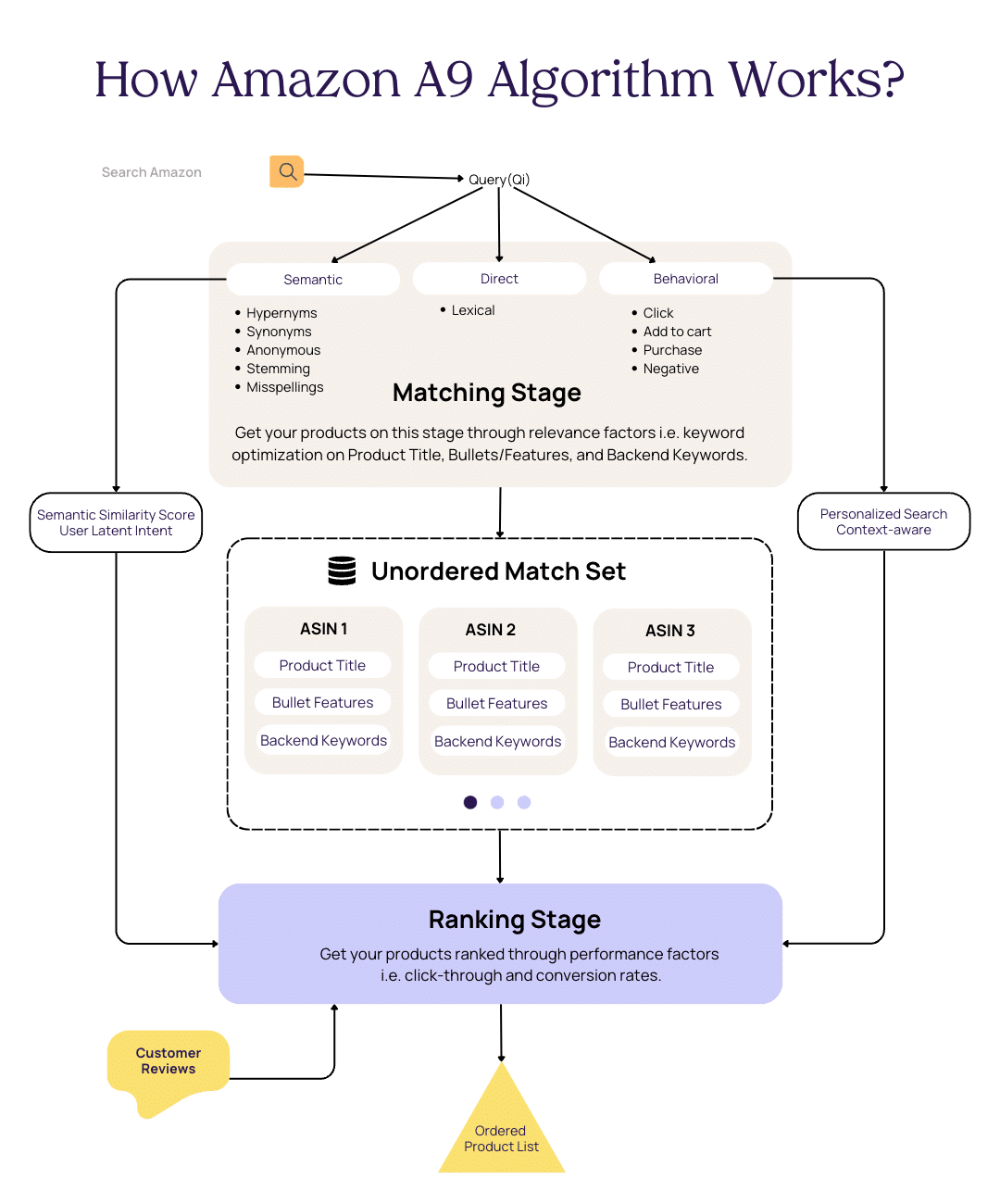
How Amazon algorithm works

Two ranking factors for Amazon SEO

There are two factors that fundamentally help match and rank products for Amazon SEO; relevance factors and performance factors.

Relevance factors

Relevance factors relate to the matching stage where a product is associated with a range of keywords. Product listings must be optimized with relevant keywords for the product and target audience. 

Amazon considers several fields when matching products to search queries:

  • Product titles
  • Bullet features
  • Amazon backend keywords.

Performance factors

Performance factors are used at the ranking stage to inform the algorithm on which products customers engage with most. It looks at product views, add-to-carts, and purchases, other metrics playing a crucial role in ranking products are:

Click-through rate

Click-through rate is the number of clicks your products get divided by impressions. It is an important metric for Amazon SEO because it shows the algorithm the relevance of the product to the search query. Higher clicks mean more customers think the product is relevant to their search. To improve the click-through rate, you need to optimize the product title, main image and offer competitive pricing or discounts. While there are other factors that brands do not have direct control over such as ratings & reviews, they should improve as you generate more sales.

Conversion rate

Conversion rate is the number of sales your product gets divided by clicks. It is an important metric because it shows the efficacy of the content quality on the product details page. To improve conversion rates, you need to optimize your product details page with more images, bullets/features, A+ Content, and FAQs.
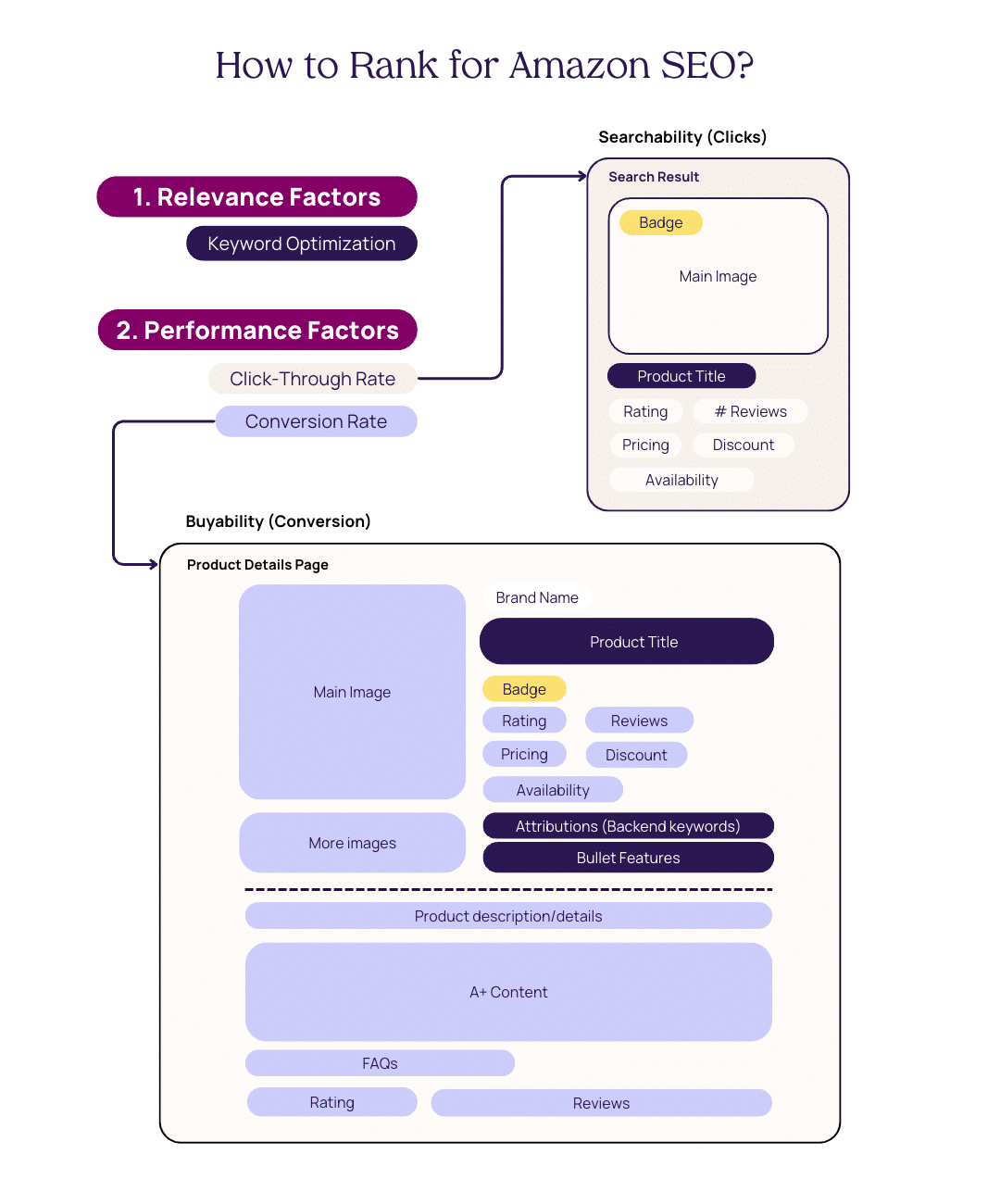
How to rank for Amazon SEO?

How to optimize keywords for Amazon SEO?

Optimizing keywords for Amazon SEO is crucial to improving your product’s visibility, organic growth, and new-to-brand customers. However, you first need to do keyword research using your product knowledge, by leveraging related keywords for the product, and by understanding the target audience.

While you can use the free keyword research tool, for more complex Product Content optimization, Trellis’ content module provides a complete solution. Supporting everything from keyword exploration to creating SEO-optimized product listings with a few clicks using search term reports, our inline copy editor, and AI (more on it later). 

While our platform uses all the best practices for optimizing product listings for SEO, here is a breakdown of how to optimize keywords in the product title, bullet points/features, and backend keywords on Amazon:

1. Product Title

Optimizing product titles is critical for the Amazon A9 algorithm to find relevancy and make customers click on the product. Therefore, brands should focus on highly relevant keywords for their target audience.

The most effective practice is front-loading relevant keywords to catch shoppers’ attention. Avoid keyword stuffing, it negatively impacts readability providing a poor experience. Instead, put the most relevant keywords first. This includes the brand name, what the product does, and any specifications your target audience is looking for.

While there is no perfect formula that always works, here is a guideline you can use to create effective product titles consistently.

Product Title Template = Brand Name + Product Keyword | Feature + Product Keyword + Benefit | Product Keyword + Benefit | Feature + Product Keyword – Color/Size/Qty.
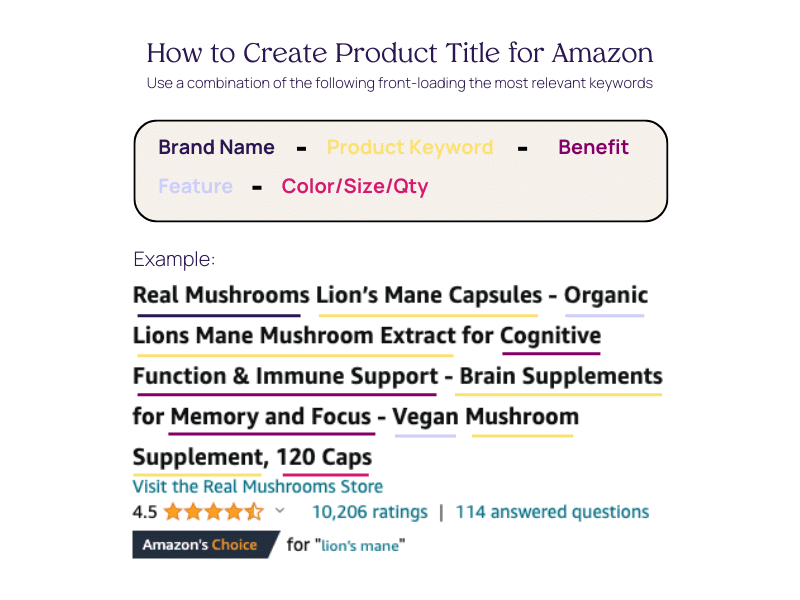
How to write a product title for Amazon template

Here are some more guidelines for writing a product title:

  1. Capitalize the first letter of each word, unless it is prepositions (with, in, on), articles (a, an), and conjunctions (or, for, and).
  2. Use hyphens (-) and slashes (/) when separating information.
  3. Avoid special characters such as _ ~ { } # < > | * ; ^ ¬ ¦}
  4. Keep it within the 50 – 200 character limit and avoid truncation.
  5. Follow category-specific requirements as some categories may have different requirements.
  6. Use ‘and’ instead of the ampersand (‘&’), unless the ampersand is included in the brand name.
  7. Use numbers as numerals, not words (e.g. 10 instead of ten).
  8. Use abbreviations for measurements, such as “cm”, “oz”, “in”, and “kg”.
  9. Don’t put prices, promotions, symbols, seller information, or suggestive commentary in the title (e.g., don’t say you are the best).
  10. Don’t include the color or size if they aren’t directly relevant to the product. (for example, a stainless steel toaster).

2. Bullet Points/Features

Amazon bullet points are product features/benefits presented in lists. By leveraging relevant keywords, you can highlight product features/benefits and optimize the product listing. Keywords that you couldn’t use in the title can be used here; they are like an extension of the product title. 

Bullet points aim to capture and retain shoppers’ interest. By crafting compelling bullet points, sellers can harness this style to efficiently convey their products’ distinctive advantages and merits. This, in turn, increases the likelihood of attracting and capturing potential buyers.

These bullet points are placed on the product details page under ‘About this item’.
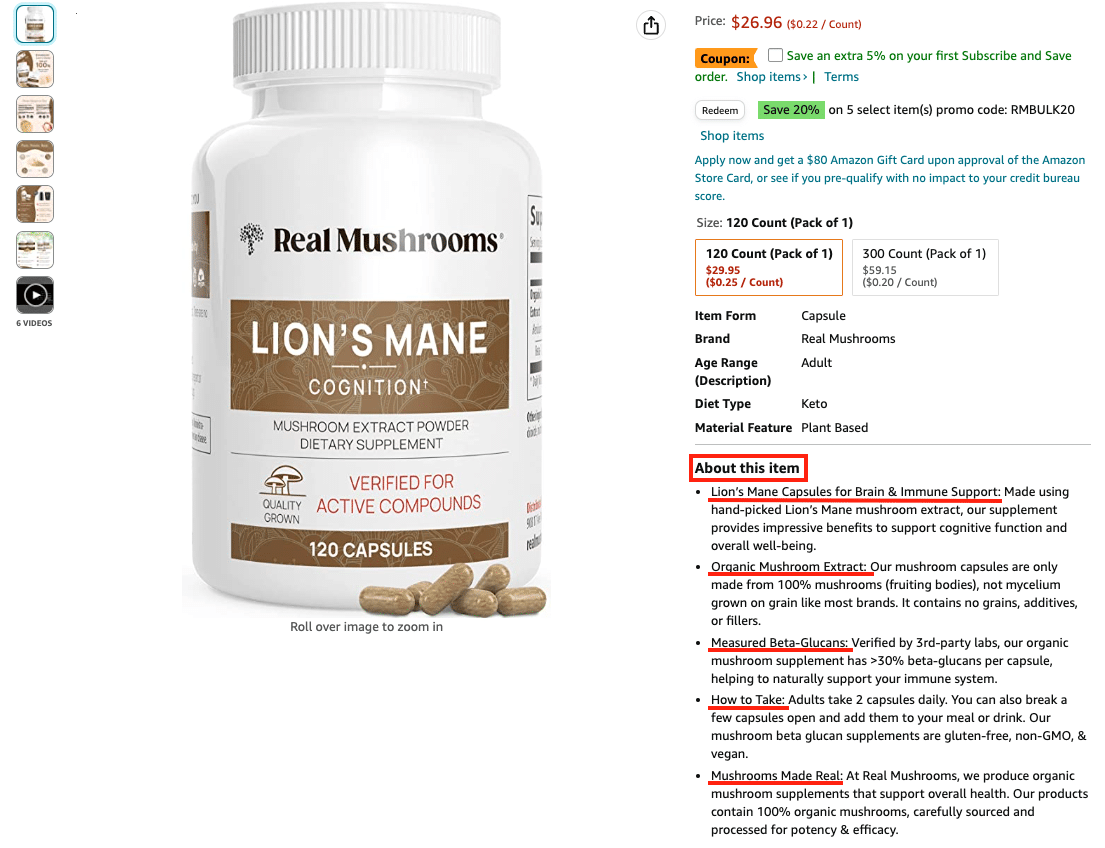
Amazon bullets and features example

Here’s a step-by-step guide to writing compelling bullet points for Amazon:

  1. Start with bullet points with features and benefits followed by a colon and further expansion to the point. Many sellers use all caps for the first part of the sentence to catch attention.
  2. Sellers have 500 characters with 5 bullet points. For vendors, it is 250-255 characters with 10 bullet points.
  3. Your bullet points should list 5 features of your product that are considered its key features or most important characteristics. 
  4. Ensure that all your bullet points have uniform length, not too short nor too long. 
  5. Avoid promotional content, pricing information, and discounts.
  6. It is important that your bullet points emphasize the relevant facts and functions of your product rather than sounding like a marketing pitch.

3. Amazon Backend Keywords

Also known as search terms or hidden keywords, Amazon backend keywords are crucial to optimizing your product listing for search. These keywords are not visible to customers but are used by Amazon’s search algorithm to determine your product’s relevance for specific search queries. 

Amazon backend keywords have various fields:

  1. Search terms: List the relevant keywords such as semantic keywords including all possible options your target customers use when searching for your products. 
  2. Target audience: List down all your possible target consumers of the product. If you need more ideas, consider their income, gender, profession, and location.
  3. Subject matter: Write keywords about the product’s physical appearance. Make sure you use the 250 characters to maximize space.  
  4. Intended use: Amazon wants you to describe the product’s intended use and in what condition or situation customers should use it.
  5. Other attributes: Some products have too many specific details customers might search for.
  6. Platinum keywords: Available only to platinum sellers to boost customer experience. Typically, these are merchants with a proven track record and generate millions of dollars in annual sales.
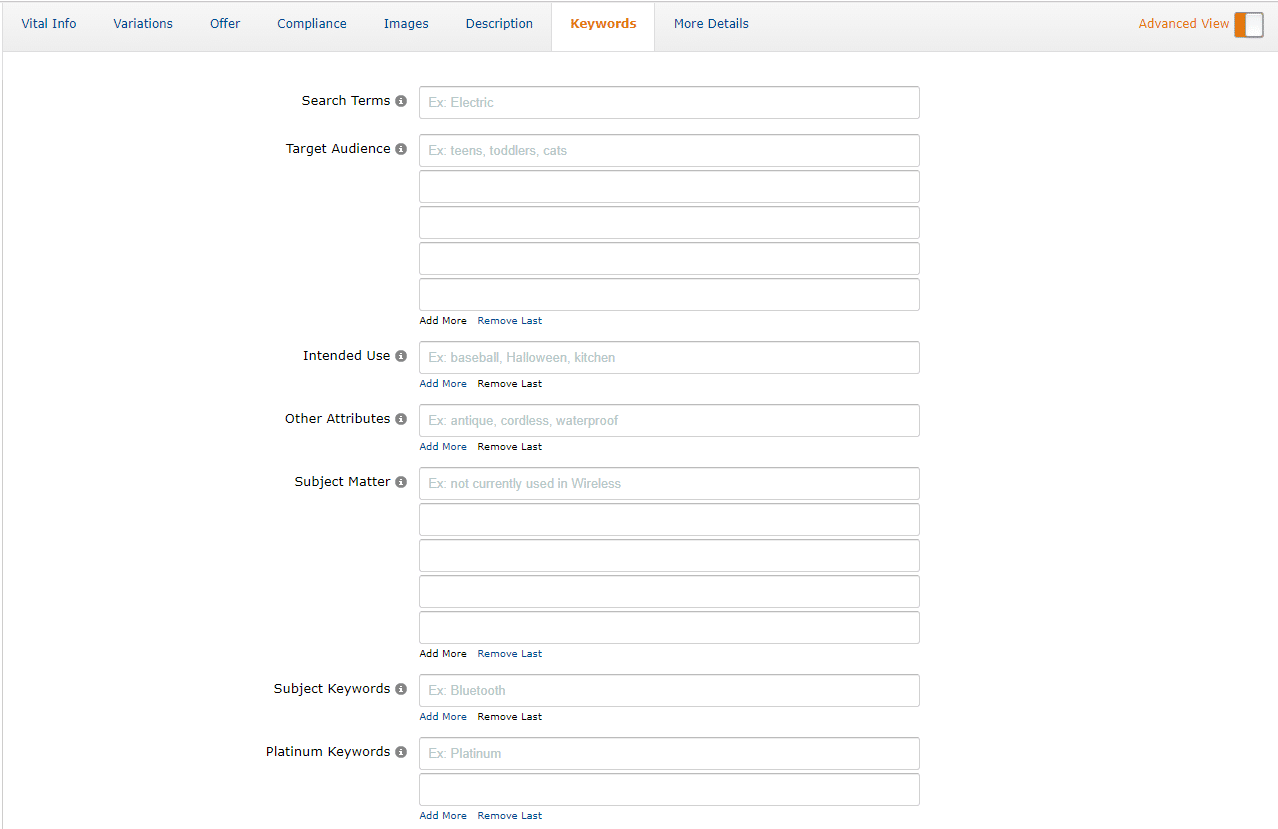
Backend keywords

Here are some guidelines for writing Amazon backend keywords:

  • Combine all the relevant search terms from your research that you couldn’t integrate into the title, bullet points, or product description. 
  • Ensure you prioritize Pay-Per-Click keywords when creating your backend keywords.
  • Use abbreviations and alternate names; online shoppers use the shortest terms to find products online. 
  • Utilize keywords that define complementary products.
  • Ignore prepositions and articles when writing keywords
  • Ensure you separate the words with spaces
  • Avoid black hat SEO practices: irrelevant search phrases, spamming, and unethical strategies.
  • Avoid punctuation.
  • Do not exceed the 250 bytes limit for keywords
  • Don’t duplicate keywords in the sections
  • Don’t write keywords as hashtags; space the words.

How to improve your click-through rate on Amazon?

Click-through rates are one of the most important factors for product ranking on Amazon because it gives signals to the Amazon A9 algorithm if the customer had any interest in the product result after making a search query.

To improve CTRs, optimize what a customer sees on the search results page: the product title, main image, price, discount, rating, and availability. 
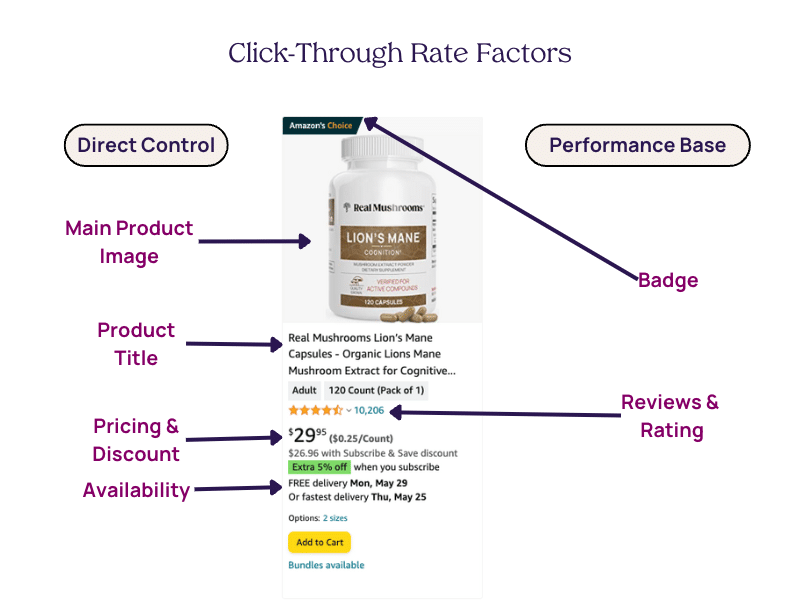
CTR factors

1. Product title and relevance

Click-through rates rely heavily on the product title. Those are the first words customers interact with to determine if the product is relevant to them. Just like we mentioned above, you can update product titles to improve relevancy and SEO.

How to write a product title for Amazon template

2. Design the main product image to pop

Your main product image is the first impression customers get of your product. It helps your product stand out from your competitors. Your main image should be clear, high quality, and placed on a white background. Showcase the product with packaging, different angles, a glimpse of what’s inside, and so on. A general best practice is to use images that speak to your target audience and the unique features you offer.

Here are some examples:
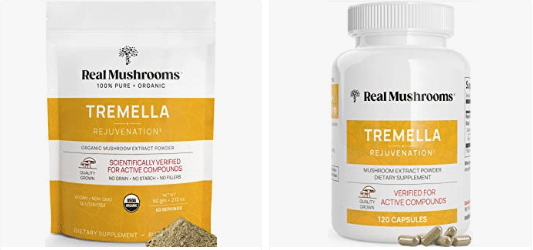
Amazon images example

Supplements can be 3D rendered to display what’s inside.
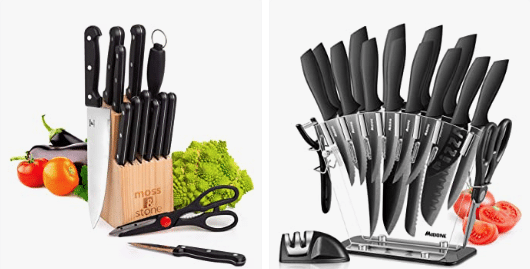
Amazon images example

These images show each piece of the knife set while creating contrast through props.
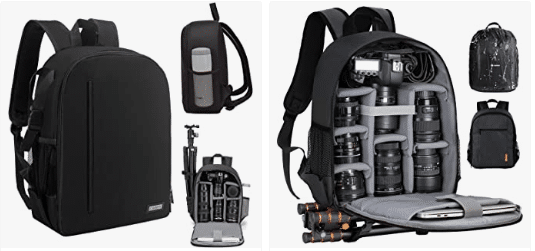
The camera bags show a front view, back view, and open view highlighting how you will place your camera, lens, and other accessories.

Amazon provides some requirements you need to adhere to but here are some tips to make your main product image pop.

  • Analyze your top competitors’ main images on Amazon to understand what types of images are successful, and the ways they stand out. 
  • Identify common elements and patterns like in the examples above.
  • Make sure your product occupies 85% of the image
  • Use a bright, clear, bold image that will entice someone to click through to your listing
  • Add a drop shadow to make it appear more three-dimensional.
  • 3D render images to make them attractive and stand out. 
  • Give a close-up shot of your product, such as a leather sofa showing its fabric.

3. Use dynamic pricing 

Pricing can play a qualifying role if the customer is satisfied with the range of products they see on the search results page. Customers are more likely to click on products with lower or competitive prices. While you can control pricing, it is difficult to analyze and frequently update prices for a range of products. 

This is where pricing automation comes in handy. It analyzes the right price for your product maximizing your profits or sales then updates those prices itself. Staying competitive on Amazon is crucial to getting customers interested in exploring your product. 

However, the pricing strategy may vary for different types of products such as luxury goods will have a different pricing strategy than everyday consumable goods. To resolve this, dynamic pricing gives you enough control to keep pricing within a range and operate within those parameters.
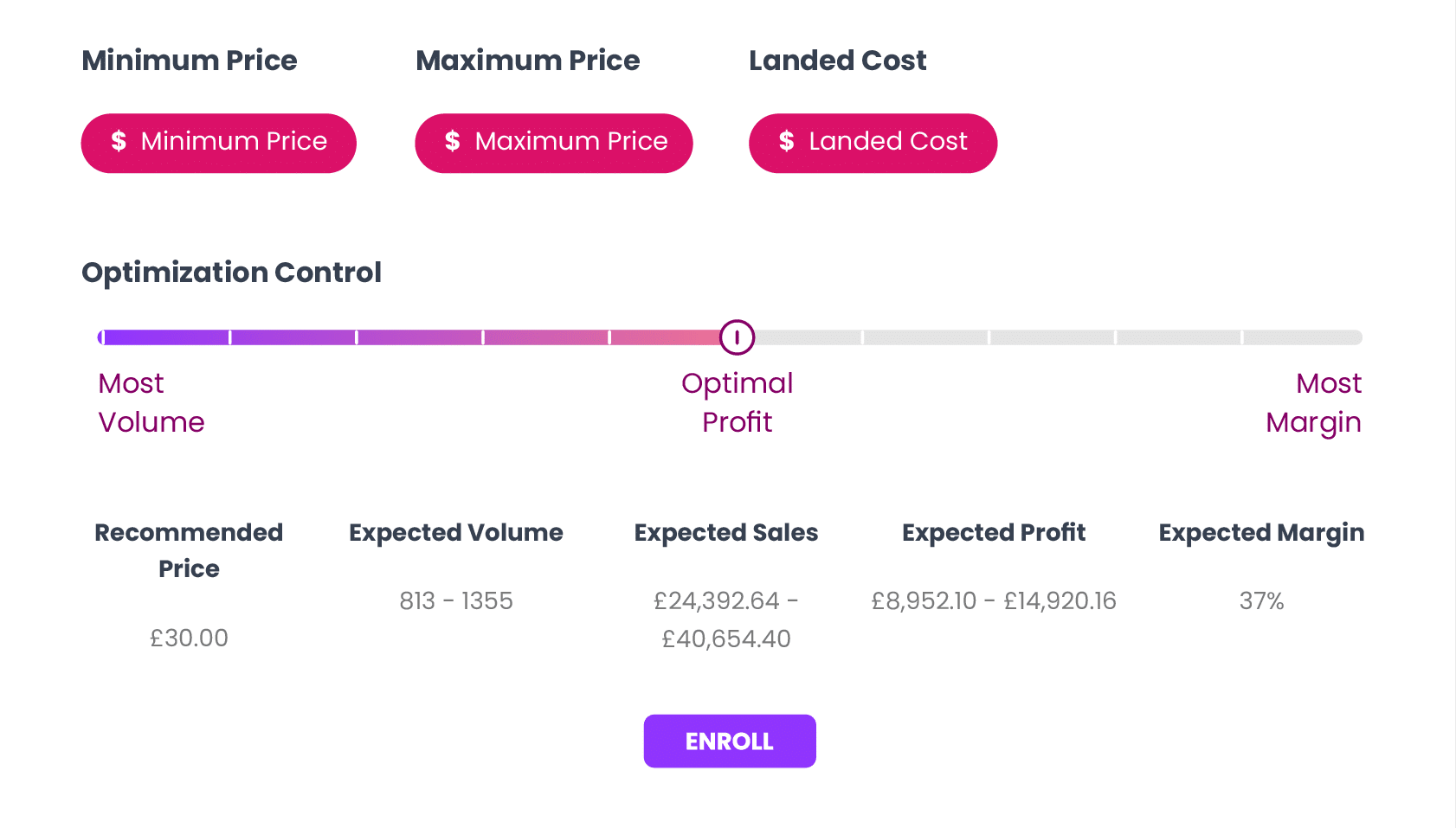
Dynamic Pricing Solutions

Trellis’ Dynamic Pricing dashboard gives you control to maximize your return.

4. Offer Amazon discounts

A customer is more likely to click and buy a product if it offers discounts. Amazon provides various types of promotions including deals, coupons, and prime discounts.

If a customer searches for products with competitive pricing across the results, the product that gets the most attention is the one that is heavily discounted. This is because Amazon increases the visibility of promotional products through colored tags and lists them on Today’s deal page.
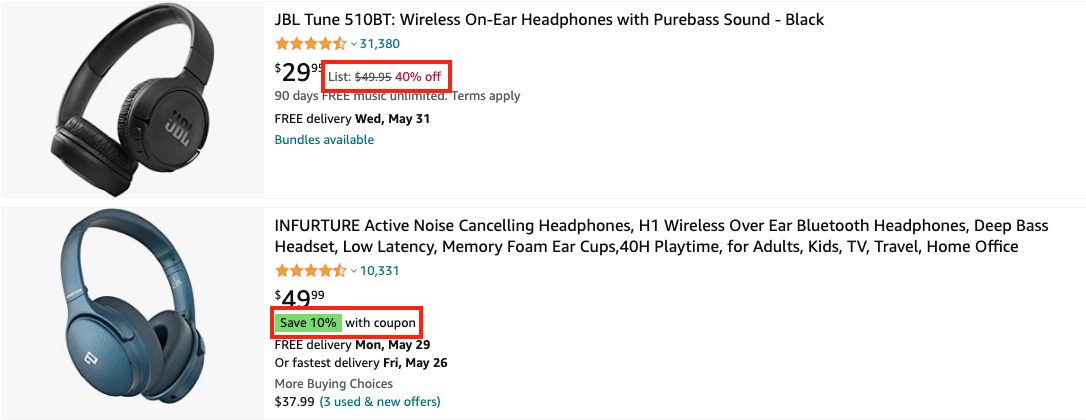
Amazon promotions example

5. Strive for Ratings & Reviews

Reviews and ratings give social proof which is crucial for any product sold online. Research shows 84% of online customers trust online reviews, and 91% read them. High ratings along with a significant number of reviews play a significant role in getting the customer to your product details page.

On the search results page, customers can view the product rating and how many customers have rated their experience. More people rating or reviewing validate feedback on the product performance. Positive reviews and a high star rating shows that customers like the product and its quality. 

This creates a snowball effect as the social proof helps your customers make purchase decisions more quickly, informing the A9 algorithm to rank your products higher, and starting the cycle all over again.  
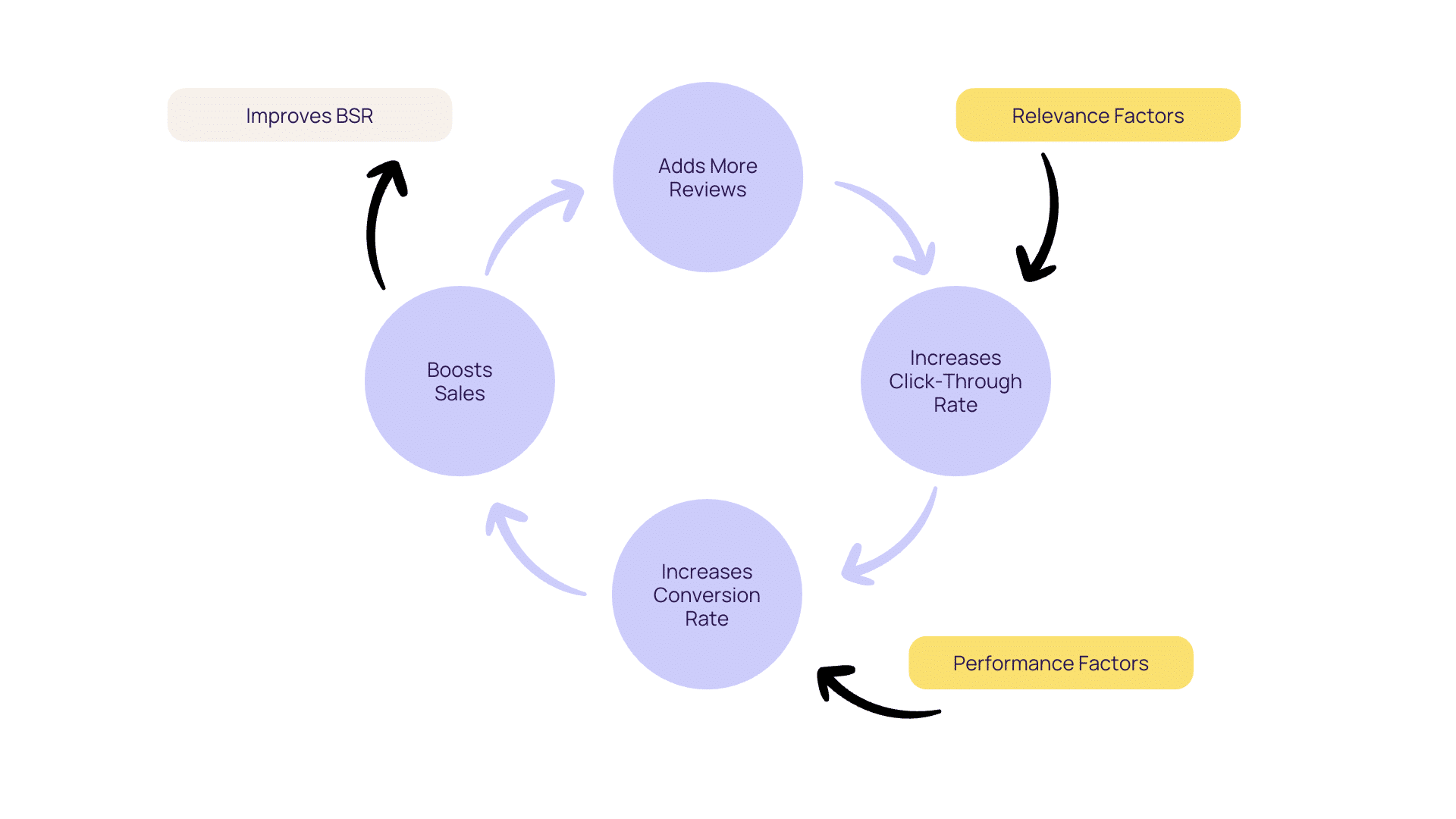
Amazon sales flywheel

You may not have direct control over reviews and ratings. However, there are things you can do to increase the chances of getting more reviews such as requesting reviews, product inserts, and building an email list.

6. Get Amazon Prime availability 

Your stock’s unavailability can damage your organic ranking. If you’re out-of-stock, A9 will rank you lower as you have no products to sell and you won’t be able to convert. If your products are always in stock, you’re more likely to maintain or improve your Best Seller Rank (BSR). Keep track of your inventory to avoid running out of stock. 

Moreover, customers are also looking for faster delivery which is helped by using FBA (Fulfillment by Amazon). FBA products qualify for Amazon Prime, where products are delivered faster. It’s essential to note that A9 prioritizes FBA listings over non-FBA listings when ranking.

7. Learn from Amazon badged products

While Amazon rewards various badges, products with Best Seller and Amazon’s Choice get more clicks and conversions. They give products more credibility. Customers tend to trust and buy them without much thought.

Sellers cannot directly control it but strategizing all 4Ps of marketing in tandem can help them get rewarded with badges. For new products, it will take time to get there, but mature products that have been sitting on the shelf for a while should strive for the badge.

How to improve your conversion rate on Amazon?

Once customers get to your product details page, it already gives a strong signal to the ranking algorithm. But the customer, in most cases, clicks on several products and buys one. To win that battle Amazon gives plenty of space on the page for you to showcase your product through more images, product details, and questions that customers may have.

1. Design more images

The first thing most customers look at on the product details page are the images. With high-quality and creative images, brands step forward in the race. 

As the main image sets an expectation, other images should continue to provide more value. Too many similar images would feel redundant, make your product feel sparse with value, or refuse to satisfy the escalated curiosity a customer feels when they are about to purchase a product. Without detailed content, your customer may not purchase even if your product is right for them. 

To compete, you need professional photography and design skills to create aspirational experiences for your customer. What works for successful brands is a combination of lifestyle photography and infographics. Photography creates emotion, while infographics accelerate content consumption. 

Lifestyle images display the product in action. Some listings may require more than others. A pair of jeans may need more lifestyle shots than a supplement bottle. A pair of jeans should be shot from different angles; front, back, side, zoomed in, or in some other action. Since the potential customer can’t try on the product, these images help them imagine themselves in the jeans.

Infographic images are more popular with products that have less visual inclination. For example, a supplement bottle will benefit from infographics that include capsule size, ingredients, features, and certifications. 
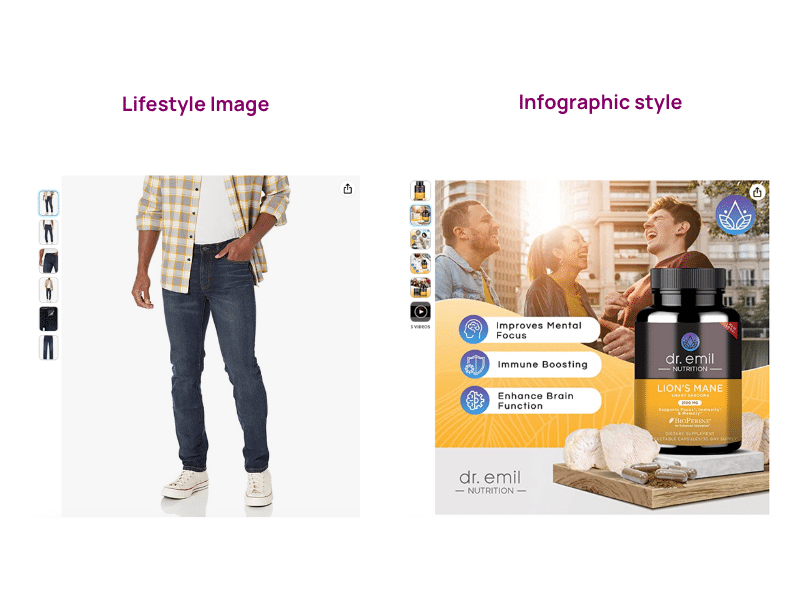
Amazon images example

2. Turn images into video 

Video helps the customer understand and relate to the product more effectively. You can use a quick video maker or if you have the budget, shoot professional videos that give your product more life.

Several studies show the positive impact of videos on conversions because they are easy to consume. 73% of visitors that view video content are likely to buy the product which is why 92% of marketers say that video content is an indispensable part of their marketing strategy. 

It is no surprise that Youtube has become the second biggest search engine. Viewers are able to get quick yet detailed answers because it takes less effort to consume visual information. Brands using videos get to share more benefits in less time increasing the chances of their products being purchased.

2. Write the benefits/features with clarity

As mentioned above, bullet features not only optimize for Amazon SEO, they help with conversions. Bullets with clear and compelling copy can be powerful for brands as they are placed above the fold.

3. Add more details below the fold

While there is no clarity about whether the content in the product descriptions supports Amazon SEO, it provides an opportunity for brands to give out more technical details and specifications about the product.

  • Product Information is in a table format that is consistent across all products but some information may vary depending on the product.
  • Product Description is a paragraph-style format that brands can write however they want to describe their product in text only.
  • What’s in the Box section is a list of things a customer can expect in the packaging.
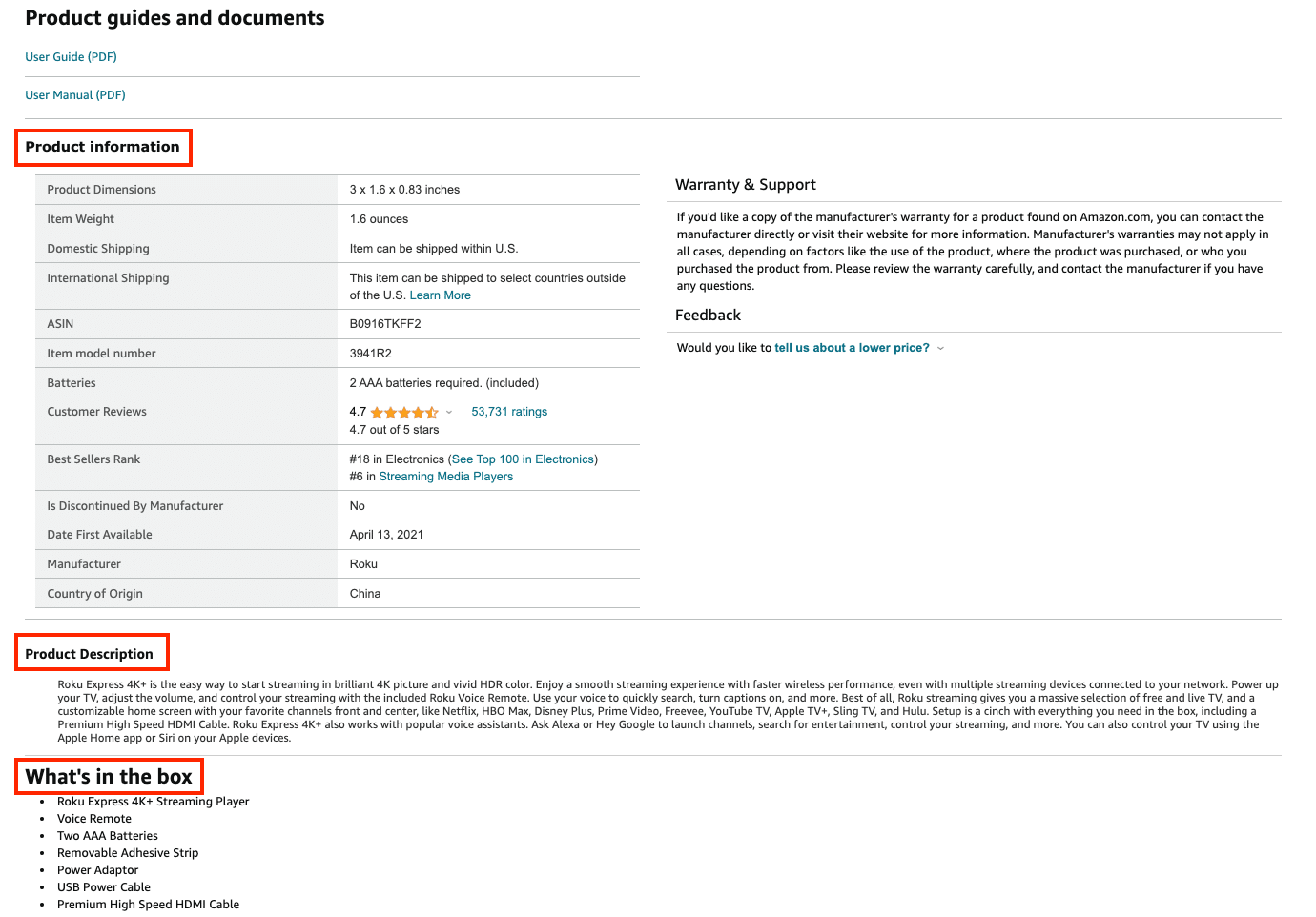
Amazon detail section

4. Tell your brand story with A+ Content

While the product description section does not look as pretty, registered brands on Amazon have an opportunity to create more interactive, creative content to tell their brand story. It helps customers build a connection with the brand and trust the product more. 

A study shows A+ content can increase conversion rate by more than 200%. However, A+ content can vary based on a number of factors, such as category, content quality, and target audience. When creating A+ content for your product, follow the best A+ content practices and check out your competitors’ A+ content.
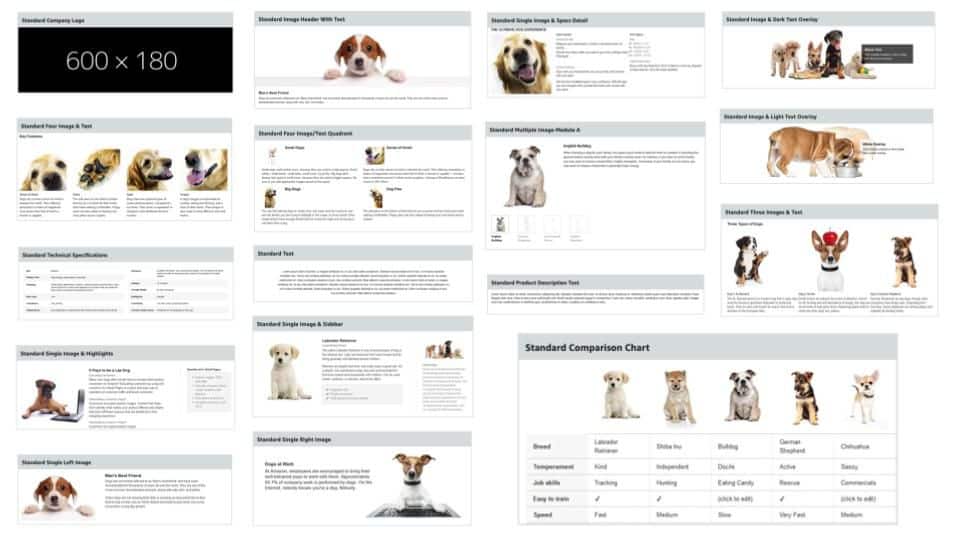
Amazon A+ Content modules

Brands can add up to 7 modules out of these 17 module options to create A+ Content. It usually starts with a brand logo, a brand story, features, benefits, and comparison charts. On comparison charts, you can list all your product variations for customers to find a suitable product for their needs. 
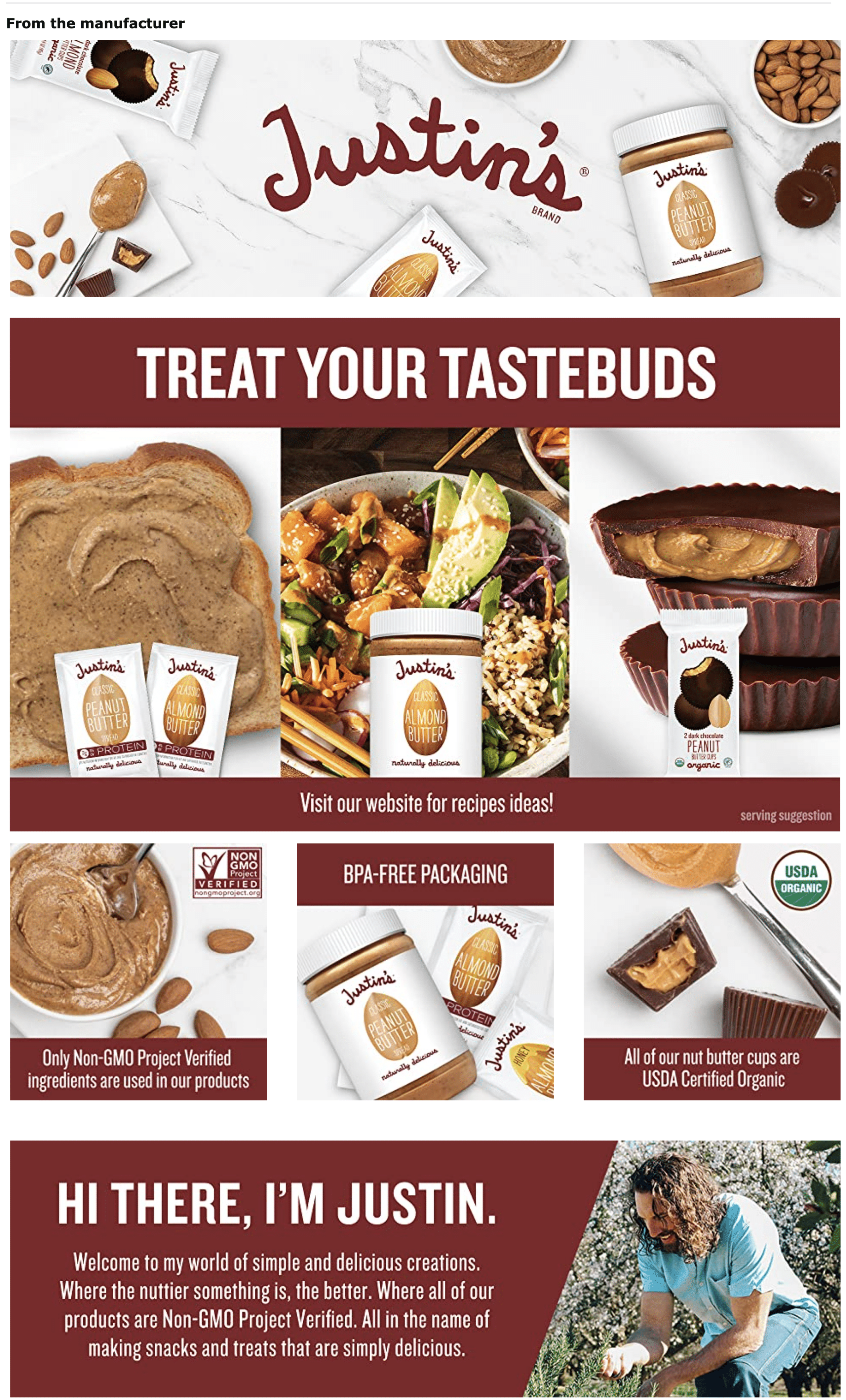
Amazon A+ content example

5. Remove hesitancies through FAQs

Brands may miss some information on their product details page. Amazon resolves this by offering a FAQ section. Brands can write FAQs themselves or answer customer questions. It could make or break a sale as it could eliminate any hesitancies a customer might have. 

If a brand sells a fitness tracker with water resistance of 5 ATM and doesn’t find it on the product details page with so much content already there, then an FAQ section could help and convert a sale.

How to analyze my Product Content?

If you have a range of products, creating content for all of them can be a challenge and you may miss out on several fields. If you have outsourced your Product Content and want to track if all the boxes are checked, analyze it using the Trellis Product Content module.

Trellis has created a tool based on the Amazon A9 algorithm which focuses on the matching and ranking stages. You can use our Searchability and Buyability scores to evaluate your content.

Searchability Score: Get more clicks

Searchability is the ability of shoppers to find your products, determined by their ranking for search terms. The more searchable your product is the more visible it will be on search results pages. The Searchability Score tracks how well your product ranks on the digital shelf. 

Here are the Searchability Score factors: Title, Price, Hero image, Retail Readiness, Ratings, and Page Views.
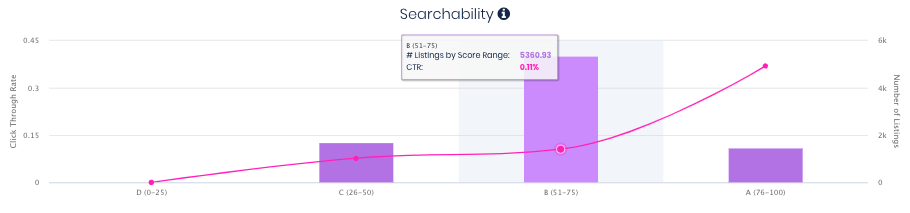
Trellis Searchability score - content analyzer

Buyability Score: Convert better

Buyability is the likelihood that a shopper will purchase your product, determined by the quality of the content. The better your content, the more likely you can convince a customer to purchase your product. 

Here are the Buyability Score tracks: Images, Videos, Feature bullets, A+ Content, Reviews, and Product FAQs.
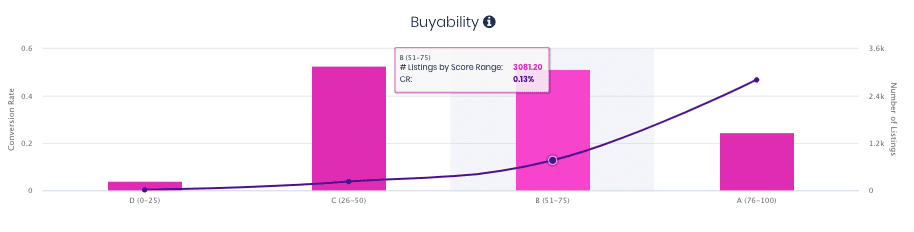
Trellis Buyability score - content analyzer

AI Features for Product Content

Other than analyzing the prerequisites of a successful product content strategy, the module offers some tools to create SEO-optimized content faster.

You can start off by exploring keywords or phrases, and add them to your list. You can also find out which keywords or phrases have already been used in your title, bullets, backend search terms, and description.

Once you have the list of keywords you want to use, you can generate SEO-optimized content with a single click. You can click again, to get another variation.

Once you have the content that you want, you can use the inline copy editor to make changes.

The tool goes deeper into content and competitor analysis. If you want to learn more about the Product Content Module, book a demo.
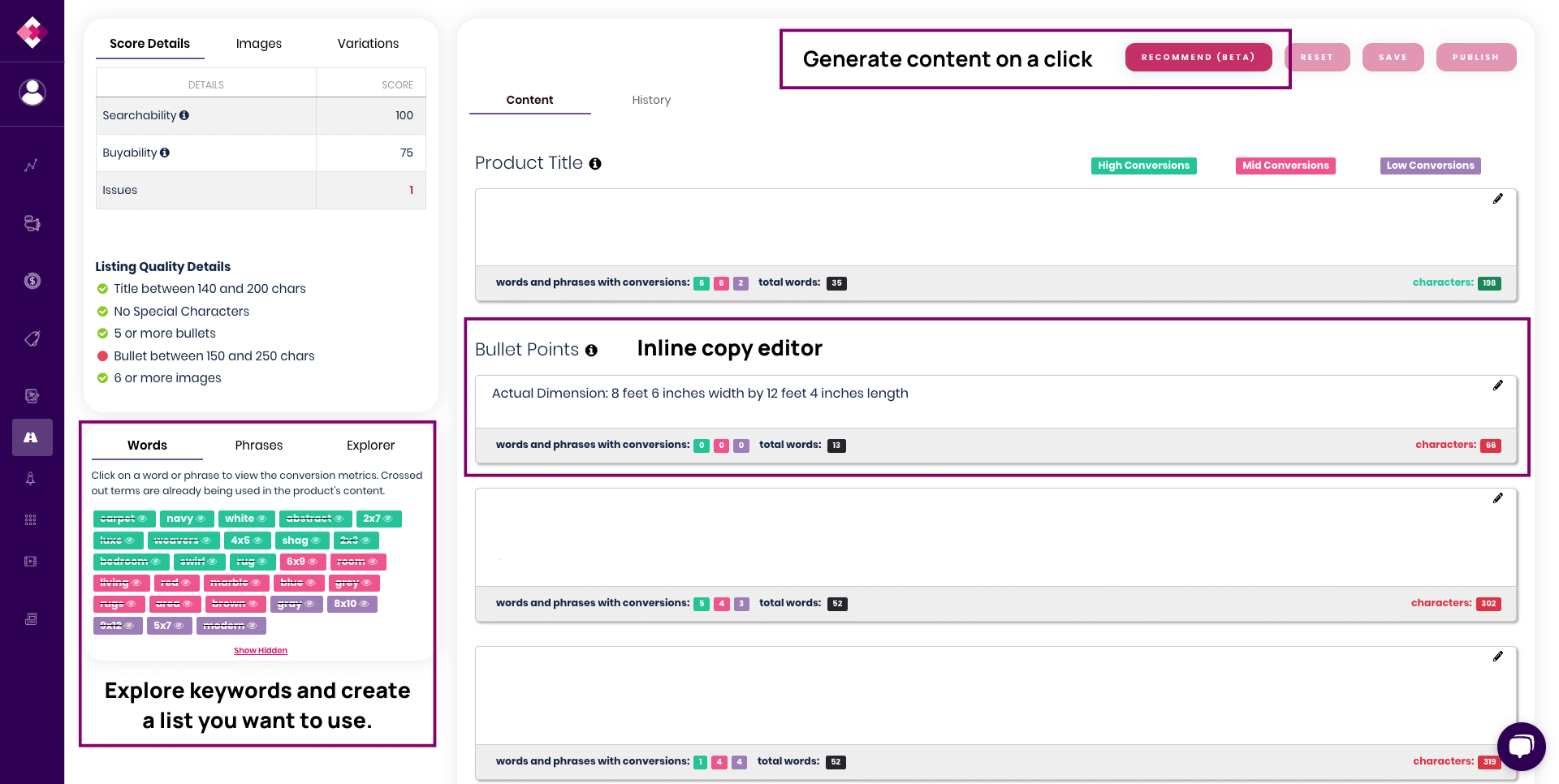
Trellis Content Module

In Summary: What’s Next?

Your competitors are also optimizing their Product Content for SEO, therefore, this should be an ongoing process. If your Searchability score or click-through rate is low, you need to focus on keyword optimization. If your Buyability score or conversion rate is low, you need to focus on the retail readiness of the product details page. 

Continuous optimizations are key to retaining the top organic spot at Amazon. If you want to update content faster, you can utilize AI tools to work on a range of product listings and track their performance so you can make changes quickly. 

Can You Change the Content of the Product Recommendations?

Publishers have complete control over the content. Amazon sellers cannot ask publishers to write what they want. The aim of the program is to help shoppers make informed decisions. So, it’s likely that your product will get positive feedback!

Want tips like this delivered straight to your inbox every month? Subscribe to The Climb, Trellis’ monthly newsletter, for quick updates and practical insights to help your eCommerce business keep growing.

How to Get Your Product Featured

There are three ways to get your product into an Amazon Editorial Recommendation. Each has its own trade-offs.

1. Organic Selection

Publishers in the Onsite Associates Program are free to write about any product they choose. If your product is strong enough, you may get selected without doing anything at all.

This is the best-case scenario because it costs nothing and carries the same credibility as a paid placement. The downside is that you have very little control, it is difficult to track, and it is not something most sellers can count on consistently.

2. Direct Publisher Outreach

You can research publishers in the Onsite Associates Program and pitch your product directly. Some publishers are open to this, but most receive a high volume of requests and are slow to respond.

This path is time-consuming and has a low success rate. It may also involve upfront fees depending on the individual publisher. For most sellers, it is not the most efficient use of time.

3. Working with a Specialized Agency

The most reliable and trackable path is working with an agency that has established relationships with publishers in the program. Companies like SellerRocket act as the bridge between sellers and publishers, they screen your product against publisher standards, match it with the right publisher for your category, and manage the process through to a live article.

Most agencies operate on a performance-based model, meaning you pay when your product goes live. Some charge only when your product secures a top-three placement. This makes the investment more predictable.

In Summary

Amazon Editorial Recommendations give established sellers a powerful way to reach page 1 of search results, without relying entirely on pay-per-click advertising or organic ranking alone. To qualify, your product needs strong reviews, consistent sales, and a well-optimized listing. From there, you can pursue a placement organically, through direct publisher outreach, or by working with a specialized agency.

The sellers who benefit most from editorial recommendations are the ones who have already done the foundational work,  competitive pricing, keyword-rich content, efficient advertising. Because when those pieces are in place, editorial recommendations don’t just drive traffic. They compound everything else you’re already doing, lifting organic rankings, improving PPC efficiency, and building the kind of brand credibility that keeps shoppers coming back.

If you’re working toward that foundation, Trellis can help you get there faster. Book a Demo to see how.

Frequently asked questions

What are Amazon Editorial Recommendations?
Amazon Editorial Recommendations are short, editorial-style articles written by third-party publishers in Amazon’s invite-only Onsite Associates Program. They appear on page 1 of search results when a shopper searches for a relevant keyword, and they feature product placements from sellers whose listings meet Amazon’s eligibility criteria.
Does my product qualify for Amazon Editorial Recommendations?
Your product generally needs to meet the following criteria: 100 or more reviews with at least a 4-star rating, monthly sales of around $30,000 or more, a ranking in the top 20% of best sellers in its category, adequate inventory, and no medical claims or content related to drugs, religion, or sex. This program is designed for established sellers, not first-time product launches.
How often do Amazon Editorial Recommendations show up in search results?
On average, editorial recommendations are displayed about 25% of the time for a given keyword. Amazon’s machine learning algorithm determines when and to whom recommendations appear, factoring in location, time of day, and a shopper’s previous search and purchase history.
How do I get my product featured in an Amazon Editorial Recommendation?
There are three main ways: your product can be selected organically by a publisher, you can reach out to publishers directly (though this is time-consuming with low success rates), or you can work with a specialized agency that has established relationships with publishers in the Onsite Associates Program.
How much does it cost to get an Amazon Editorial Recommendation?
If your product is selected organically, there is no cost. Paid placements through agencies typically involve a three-part fee structure: an upfront curation fee, a monthly maintenance fee, and a small percentage of directly attributable sales. Costs vary, but placements often start at $500 or more depending on the number of Amazon Standard Identification Numbers (ASINs) involved.
What happens if I don't like what the publisher writes about my product?
Publishers have full editorial control — sellers cannot request changes to the content. That said, publishers earn a commission on every qualified sale their recommendation drives, so they are naturally incentivized to write positively about products that perform well.
Picture of Hogan Short
Hogan Short
Content Writer: With experience spanning copywriting, editorial, and agency work, Hogan has written for a range of tech sites and companies. He has helped launch websites, blogs, newsletters, landing pages, and ad campaigns, bringing a versatile skill set to the Trellis team. At Trellis, he focuses on creating blog content, newsletters, guest articles, case studies, and other written resources that help people understand the brands better. Outside of work, Hogan is passionate about film and sports...he rarely misses a new movie release and can often be found on the golf course. In 2019, he also published his first novel.

Trending Posts

Walmart Marketplace App Store Guide for Sellers in 2026
April 22, 2026
How to Get Your Product Into Amazon Editorial Recommendations
April 22, 2026
Choose To Sell More With Trellis
Book a Demo

Subscribe for growth tips and tricks straight to your inbox.

Facebook Instagram Linkedin Youtube

Features

  • Product Advertising
  • Dynamic Pricing
  • Product Content Optimization
  • Product Promotion
  • Market Intelligence

Marketplaces

  • Amazon
  • Walmart

Resources

  • Free Tools
  • Blog
  • Case Studies
  • eBooks
  • Training

Get Started

  • Schedule a Demo
  • View Pricing

Company

  • Contact Us
  • Partner Directory

©Trellis Corporation 2026

•  Privacy Policy •  Terms and Conditions

How to Get Your Product Into Amazon Editorial Recommendations

Like product reviews, Amazon Editorial Recommendations also help shoppers make a buying decision. If you’re looking to win on Amazon, adding this powerful program to your strategy can boost sales like never before.

Looking for proof that a smarter Amazon strategy actually works? Check out Trellis’ Success Stories to see how brands like yours have grown sales, improved margins, and scaled profitably.

Key Insights

  • Editorial Recommendations are a page 1 opportunity, even if your organic rank isn’t.
  • You have to earn your way in. This program is not for new sellers. Qualifying products generally need 100 or more reviews and a 4-star rating or higher.
  • Editorial Recommendations work best as part of a full-funnel strategy. 

What Are Amazon Editorial Recommendations?

Amazon Editorial Recommendations is a program that highlights products through editorial-style content. These product recommendations show up on the first page of search results. These recommendations help shoppers make an informed buying decision.

This type of exposure is valuable for Amazon sellers, as it can lead to a significant increase in sales. The opinions and information featured in the recommendations belong to the content creator.

How Does It Work?

Publishers and bloggers under the invite-only Amazon Onsite Associates Program can write these recommendations. This includes leading publications such as Forbes and The New York Times. The Onsite Associates Program is an extension of Amazon’s Associate (affiliate marketing) program. It allows the integration of third-party content into Amazon.

Publishers have complete control over the content of the recommendations. Neither the sellers nor Amazon can influence any part of the process. Content creators receive a commission if a shopper buys a product after clicking on the link.

Want to see how advertising, pricing, and content work together to drive real growth? Download Trellis’ free eBook on full-funnel marketing strategy — a practical framework for growing your brand upward and in the right direction.

What Are the Benefits?

There are many benefits of having a product featured in Amazon Editorial Recommendations. Some of the most notable benefits include:

1. Increased traffic to your product listing

The key benefit of Amazon Editorial Recommendations is that they will increase traffic to your product listings. This, in turn, can lead to a significant increase in sales.

2. Improved SEO performance

Recommendations can help improve your product’s organic ranking in search engines. Amazon’s editorial content is often featured on other websites and publications. This can help increase your product’s exposure and visibility online and lead to improvements in PPC performance.

3. Enhanced customer trust

Amazon Editorial Recommendations can also help enhance customer trust. This is because shoppers consider these product recommendations to have high credibility.

4. A boost to your brand

Amazon editorial recommendations can help increase your brand’s visibility and reputation. When reputed publishers recognize your products, it is likely to build trust and credibility.

5. Access to exclusive promotional opportunities

Having a product recommendation gives you access to exclusive promotional opportunities. For example, this can lead to an opportunity to have your product featured on Amazon’s marketing channels.

What are the Basic Requirements to Qualify?

To qualify for editorial recommendations on Amazon, your product must meet the following criteria:

  • A 4+ star rating
  • 100+ reviews
  • A place in the top 20% of the Best Seller Rank based on category
  • $30,000/month in sales
  • No relation to religion, drugs, or sex
  • No medical claims
  • High levels of inventory

How to Increase the Likelihood of Getting Amazon Editorial Recommendations?

You can follow these tips to increase the chances of receiving a product recommendation from a renowned publisher.

Step One: Optimize Your Product Page

The first step is to optimize your product page for both search engines and shoppers. This includes adding high-quality product descriptions and images. Also, ensure that your product titles are keyword rich and descriptive. You can assess the quality of any product page by using our Amazon listing quality check tool.

Step Two: Encourage Customer Reviews

Encourage your customers to leave reviews for your products. This helps build credibility for your brand. Focus on providing an excellent customer experience and solving their pain points.

Step Three: Stay Active on Amazon

Stay active on Amazon by building your product line and brand. Continue to offer an exceptional level of customer service and limit negative feedback.

How Trellis Can Help You Build a Stronger Amazon Presence

Amazon Editorial Recommendations are not something you can buy your way into without a strong foundation.

To qualify, your product needs to rank in the top 20% of its category, maintain 100+ reviews with a 4-star rating or higher, and generate significant monthly sales. That means your advertising, pricing, and listing content all need to be working together before editorial recommendations become a realistic option.

Trellis’ platform is designed to help you build exactly that foundation. AI-powered advertising automation helps your products rank higher and win more visibility. Dynamic Pricing keeps your listings competitive, protecting your Buy Box position and maintaining the sales velocity that search algorithms reward.

Product Content Optimization ensures your listings are keyword-rich and built for both organic discovery and paid ad performance. And with Market Intelligence, you can track your share of shelf, monitor competitors, and identify the gaps where your brand has room to grow.

When your 4Ps — Product Content, Placement, Pricing, and Promotion — are aligned, you become the kind of seller that editorial publishers want to feature.

Ready to see what that looks like for your brand? Book a Demo with the Trellis team today.

Who Should Use Amazon Editorial Recommendations?

Amazon Editorial Recommendations are not a strategy for every seller. They are built for established brands that already have momentum — strong reviews, consistent sales, and a product that converts well on its target keywords.

If you are just launching your first product, this program is not the right move yet. You need a track record before publishers will consider featuring you, and Amazon’s eligibility criteria reflects that.

You are a good candidate for editorial recommendations if your product:

  • Has 100 or more reviews with a rating of at least 4 stars
  • Generates around $30,000 or more in monthly sales
    Ranks in the top 20% of best sellers in its category
  • Has enough inventory to handle a sudden increase in traffic
  • Is already running PPC campaigns or ranking organically for its target keywords
  • Makes no medical claims and is unrelated to drugs, religion, or sex

Think of editorial recommendations as a way to amplify what is already working, not a shortcut to fix what is not.

If you are not there yet, that is okay. Focus on building your review count, improving your listing quality, and growing your sales velocity. Once those are in place, editorial recommendations become a realistic and valuable next step.

How Much Do Amazon Editorial Recommendations Cost?

The cost of an editorial recommendation depends entirely on how you secure it.
Organic placement is free. If a publisher selects your product on their own, you pay nothing. The trade-off is that you have no control over when or whether it happens.

Direct publisher outreach may involve fees that vary by publisher. There is no standard structure, and terms can be unpredictable.

Agency placements follow a more defined pricing model. Most agencies charge across three components:

  • An upfront curation fee to enter your products into the system and match them with appropriate publishers
  • A monthly maintenance fee to keep your account active and pursue new placements over time
  • A percentage of directly attributable sales generated by the recommendation

Fees typically scale with the number of ASINs you want featured, with pricing breakpoints at around 10, 50, and 100 or more ASINs. Most placements start at $500 or more per product, though this varies.

A few important caveats before you invest:

Amazon’s native tracking for editorial recommendations is limited. Attribution is not always precise, which makes it harder to measure true return on investment. Be cautious of agencies that promise exact sales figures without acknowledging this limitation.

Do your due diligence on any agency you work with. There have been reports in the seller community of hidden commission fees. Ask for transparent pricing before you commit.

Use your Sponsored Brands performance as a benchmark. If your Sponsored Brands ads for a specific keyword convert at 5%, your editorial recommendation will likely perform in a similar range. That gives you a reasonable starting point for projecting returns before you spend anything.

On the whole, editorial recommendations offer a more predictable cost structure than pay-per-click advertising, where your Advertising Cost of Sale (ACoS) can fluctuate daily. For products with strong conversion rates, the math can work out very well.

How Long Does It Take?

Plan for 4 to 8 weeks from start to a live editorial recommendation.

Here is what happens during that window:

  • Week 1–2: Your product is reviewed against eligibility criteria. If you are working with an agency, they screen your Amazon Standard Identification Number (ASIN) and confirm it meets publisher standards before moving forward.
  • Week 2–4: Publisher matching. Your product is paired with a publisher whose content focus aligns with your category.
  • Week 4–6: The publisher writes the article. They have full editorial control, so this timeline can vary.
  • Week 6–8: The article goes through Amazon’s review process before going live in search results

Once live, there is no guaranteed duration. Amazon tracks the performance of every editorial recommendation. High-converting placements can stay live for months or even years.

Underperformers get pulled.

Product Content is the heart of eCommerce merchandising. Highly optimized content can transform Amazon products into best-sellers. An unoptimized, average-looking product listing will weigh down the other Ps of marketing.

Your product content should be highly optimized for organic ranking, and retail-ready for high conversions. To achieve those targets for your product listing, it takes understanding your audience, content best practices, content analysis, and tools that could help you create optimized product listings faster.

The Amazon A9 algorithm evaluates a customer’s search query in two stages; matching and ranking. At both stages, various factors are taken into account to find the most appropriate product for the customer’s search term.

In this blog, we dive into how to create product listings through the Amazon A9 algorithm, and how to analyze them for clickthrough and conversion rate.

What is Product Content?

Product Content is all the information about the product on the product details page. From compelling copy to intriguing images of the product, all the details help customers identify if the product is the right solution for them.

Product Content in eCommerce or on Amazon generates opportunities to get customers to buy the product. In comparison to the packaging of a physical product, there is more real estate on a product details page helping users to discern why your product is better than your competitors. As businesses move more and more of their business online this is increasingly important to think about.

Customers now look for products with more images, features/benefits, reviews from other customers, and online shopping convenience. The right content allows customers to make a buying decision without touching the product.

It is important to understand that your merchandising strategy relies more than ever on product information to help customers make a purchase at scale.

Optimizing Product Content using Amazon A9 algorithm

Amazon has explicitly revealed how its algorithm works in two stages.

Matching Stage: After a customer makes a search query, the algorithm collects products/ASINs with relevant semantic keywords such as hypernyms and synonyms, and places them in an “unordered match set”.

Ranking Stage: After the list is stored in a match set, it is sorted using historical customer behavior such as clicks, purchases, and personalized customer history including search, purchases, and brand preferences.

How Amazon algorithm works

Two ranking factors for Amazon SEO

There are two factors that fundamentally help match and rank products for Amazon SEO; relevance factors and performance factors.

Relevance factors

Relevance factors relate to the matching stage where a product is associated with a range of keywords. Product listings must be optimized with relevant keywords for the product and target audience. 

Amazon considers several fields when matching products to search queries:

  • Product titles
  • Bullet features
  • Amazon backend keywords.

Performance factors

Performance factors are used at the ranking stage to inform the algorithm on which products customers engage with most. It looks at product views, add-to-carts, and purchases, other metrics playing a crucial role in ranking products are:

Click-through rate

Click-through rate is the number of clicks your products get divided by impressions. It is an important metric for Amazon SEO because it shows the algorithm the relevance of the product to the search query. Higher clicks mean more customers think the product is relevant to their search. To improve the click-through rate, you need to optimize the product title, main image and offer competitive pricing or discounts. While there are other factors that brands do not have direct control over such as ratings & reviews, they should improve as you generate more sales.

Conversion rate

Conversion rate is the number of sales your product gets divided by clicks. It is an important metric because it shows the efficacy of the content quality on the product details page. To improve conversion rates, you need to optimize your product details page with more images, bullets/features, A+ Content, and FAQs.

How to rank for Amazon SEO?

How to optimize keywords for Amazon SEO?

Optimizing keywords for Amazon SEO is crucial to improving your product’s visibility, organic growth, and new-to-brand customers. However, you first need to do keyword research using your product knowledge, by leveraging related keywords for the product, and by understanding the target audience.

While you can use the free keyword research tool, for more complex Product Content optimization, Trellis’ content module provides a complete solution. Supporting everything from keyword exploration to creating SEO-optimized product listings with a few clicks using search term reports, our inline copy editor, and AI (more on it later). 

While our platform uses all the best practices for optimizing product listings for SEO, here is a breakdown of how to optimize keywords in the product title, bullet points/features, and backend keywords on Amazon:

1. Product Title

Optimizing product titles is critical for the Amazon A9 algorithm to find relevancy and make customers click on the product. Therefore, brands should focus on highly relevant keywords for their target audience.

The most effective practice is front-loading relevant keywords to catch shoppers’ attention. Avoid keyword stuffing, it negatively impacts readability providing a poor experience. Instead, put the most relevant keywords first. This includes the brand name, what the product does, and any specifications your target audience is looking for.

While there is no perfect formula that always works, here is a guideline you can use to create effective product titles consistently.

Product Title Template = Brand Name + Product Keyword | Feature + Product Keyword + Benefit | Product Keyword + Benefit | Feature + Product Keyword – Color/Size/Qty.

How to write a product title for Amazon template

Here are some more guidelines for writing a product title:

  1. Capitalize the first letter of each word, unless it is prepositions (with, in, on), articles (a, an), and conjunctions (or, for, and).
  2. Use hyphens (-) and slashes (/) when separating information.
  3. Avoid special characters such as _ ~ { } # < > | * ; ^ ¬ ¦}
  4. Keep it within the 50 – 200 character limit and avoid truncation.
  5. Follow category-specific requirements as some categories may have different requirements.
  6. Use ‘and’ instead of the ampersand (‘&’), unless the ampersand is included in the brand name.
  7. Use numbers as numerals, not words (e.g. 10 instead of ten).
  8. Use abbreviations for measurements, such as “cm”, “oz”, “in”, and “kg”.
  9. Don’t put prices, promotions, symbols, seller information, or suggestive commentary in the title (e.g., don’t say you are the best).
  10. Don’t include the color or size if they aren’t directly relevant to the product. (for example, a stainless steel toaster).

2. Bullet Points/Features

Amazon bullet points are product features/benefits presented in lists. By leveraging relevant keywords, you can highlight product features/benefits and optimize the product listing. Keywords that you couldn’t use in the title can be used here; they are like an extension of the product title. 

Bullet points aim to capture and retain shoppers’ interest. By crafting compelling bullet points, sellers can harness this style to efficiently convey their products’ distinctive advantages and merits. This, in turn, increases the likelihood of attracting and capturing potential buyers.

These bullet points are placed on the product details page under ‘About this item’.

Amazon bullets and features example

Here’s a step-by-step guide to writing compelling bullet points for Amazon:

  1. Start with bullet points with features and benefits followed by a colon and further expansion to the point. Many sellers use all caps for the first part of the sentence to catch attention.
  2. Sellers have 500 characters with 5 bullet points. For vendors, it is 250-255 characters with 10 bullet points.
  3. Your bullet points should list 5 features of your product that are considered its key features or most important characteristics. 
  4. Ensure that all your bullet points have uniform length, not too short nor too long. 
  5. Avoid promotional content, pricing information, and discounts.
  6. It is important that your bullet points emphasize the relevant facts and functions of your product rather than sounding like a marketing pitch.

3. Amazon Backend Keywords

Also known as search terms or hidden keywords, Amazon backend keywords are crucial to optimizing your product listing for search. These keywords are not visible to customers but are used by Amazon’s search algorithm to determine your product’s relevance for specific search queries. 

Amazon backend keywords have various fields:

  1. Search terms: List the relevant keywords such as semantic keywords including all possible options your target customers use when searching for your products. 
  2. Target audience: List down all your possible target consumers of the product. If you need more ideas, consider their income, gender, profession, and location.
  3. Subject matter: Write keywords about the product’s physical appearance. Make sure you use the 250 characters to maximize space.  
  4. Intended use: Amazon wants you to describe the product’s intended use and in what condition or situation customers should use it.
  5. Other attributes: Some products have too many specific details customers might search for.
  6. Platinum keywords: Available only to platinum sellers to boost customer experience. Typically, these are merchants with a proven track record and generate millions of dollars in annual sales.

Backend keywords

Here are some guidelines for writing Amazon backend keywords:

  • Combine all the relevant search terms from your research that you couldn’t integrate into the title, bullet points, or product description. 
  • Ensure you prioritize Pay-Per-Click keywords when creating your backend keywords.
  • Use abbreviations and alternate names; online shoppers use the shortest terms to find products online. 
  • Utilize keywords that define complementary products.
  • Ignore prepositions and articles when writing keywords
  • Ensure you separate the words with spaces
  • Avoid black hat SEO practices: irrelevant search phrases, spamming, and unethical strategies.
  • Avoid punctuation.
  • Do not exceed the 250 bytes limit for keywords
  • Don’t duplicate keywords in the sections
  • Don’t write keywords as hashtags; space the words.

How to improve your click-through rate on Amazon?

Click-through rates are one of the most important factors for product ranking on Amazon because it gives signals to the Amazon A9 algorithm if the customer had any interest in the product result after making a search query.

To improve CTRs, optimize what a customer sees on the search results page: the product title, main image, price, discount, rating, and availability. 

CTR factors

1. Product title and relevance

Click-through rates rely heavily on the product title. Those are the first words customers interact with to determine if the product is relevant to them. Just like we mentioned above, you can update product titles to improve relevancy and SEO.

How to write a product title for Amazon template

2. Design the main product image to pop

Your main product image is the first impression customers get of your product. It helps your product stand out from your competitors. Your main image should be clear, high quality, and placed on a white background. Showcase the product with packaging, different angles, a glimpse of what’s inside, and so on. A general best practice is to use images that speak to your target audience and the unique features you offer.

Here are some examples:

Amazon images example

Supplements can be 3D rendered to display what’s inside.

Amazon images example

These images show each piece of the knife set while creating contrast through props.

The camera bags show a front view, back view, and open view highlighting how you will place your camera, lens, and other accessories.

Amazon provides some requirements you need to adhere to but here are some tips to make your main product image pop.

  • Analyze your top competitors’ main images on Amazon to understand what types of images are successful, and the ways they stand out. 
  • Identify common elements and patterns like in the examples above.
  • Make sure your product occupies 85% of the image
  • Use a bright, clear, bold image that will entice someone to click through to your listing
  • Add a drop shadow to make it appear more three-dimensional.
  • 3D render images to make them attractive and stand out. 
  • Give a close-up shot of your product, such as a leather sofa showing its fabric.

3. Use dynamic pricing 

Pricing can play a qualifying role if the customer is satisfied with the range of products they see on the search results page. Customers are more likely to click on products with lower or competitive prices. While you can control pricing, it is difficult to analyze and frequently update prices for a range of products. 

This is where pricing automation comes in handy. It analyzes the right price for your product maximizing your profits or sales then updates those prices itself. Staying competitive on Amazon is crucial to getting customers interested in exploring your product. 

However, the pricing strategy may vary for different types of products such as luxury goods will have a different pricing strategy than everyday consumable goods. To resolve this, dynamic pricing gives you enough control to keep pricing within a range and operate within those parameters.

Dynamic Pricing Solutions

Trellis’ Dynamic Pricing dashboard gives you control to maximize your return.

4. Offer Amazon discounts

A customer is more likely to click and buy a product if it offers discounts. Amazon provides various types of promotions including deals, coupons, and prime discounts.

If a customer searches for products with competitive pricing across the results, the product that gets the most attention is the one that is heavily discounted. This is because Amazon increases the visibility of promotional products through colored tags and lists them on Today’s deal page.

Amazon promotions example

5. Strive for Ratings & Reviews

Reviews and ratings give social proof which is crucial for any product sold online. Research shows 84% of online customers trust online reviews, and 91% read them. High ratings along with a significant number of reviews play a significant role in getting the customer to your product details page.

On the search results page, customers can view the product rating and how many customers have rated their experience. More people rating or reviewing validate feedback on the product performance. Positive reviews and a high star rating shows that customers like the product and its quality. 

This creates a snowball effect as the social proof helps your customers make purchase decisions more quickly, informing the A9 algorithm to rank your products higher, and starting the cycle all over again.  

Amazon sales flywheel

You may not have direct control over reviews and ratings. However, there are things you can do to increase the chances of getting more reviews such as requesting reviews, product inserts, and building an email list.

6. Get Amazon Prime availability 

Your stock’s unavailability can damage your organic ranking. If you’re out-of-stock, A9 will rank you lower as you have no products to sell and you won’t be able to convert. If your products are always in stock, you’re more likely to maintain or improve your Best Seller Rank (BSR). Keep track of your inventory to avoid running out of stock. 

Moreover, customers are also looking for faster delivery which is helped by using FBA (Fulfillment by Amazon). FBA products qualify for Amazon Prime, where products are delivered faster. It’s essential to note that A9 prioritizes FBA listings over non-FBA listings when ranking.

7. Learn from Amazon badged products

While Amazon rewards various badges, products with Best Seller and Amazon’s Choice get more clicks and conversions. They give products more credibility. Customers tend to trust and buy them without much thought.

Sellers cannot directly control it but strategizing all 4Ps of marketing in tandem can help them get rewarded with badges. For new products, it will take time to get there, but mature products that have been sitting on the shelf for a while should strive for the badge.

How to improve your conversion rate on Amazon?

Once customers get to your product details page, it already gives a strong signal to the ranking algorithm. But the customer, in most cases, clicks on several products and buys one. To win that battle Amazon gives plenty of space on the page for you to showcase your product through more images, product details, and questions that customers may have.

1. Design more images

The first thing most customers look at on the product details page are the images. With high-quality and creative images, brands step forward in the race. 

As the main image sets an expectation, other images should continue to provide more value. Too many similar images would feel redundant, make your product feel sparse with value, or refuse to satisfy the escalated curiosity a customer feels when they are about to purchase a product. Without detailed content, your customer may not purchase even if your product is right for them. 

To compete, you need professional photography and design skills to create aspirational experiences for your customer. What works for successful brands is a combination of lifestyle photography and infographics. Photography creates emotion, while infographics accelerate content consumption. 

Lifestyle images display the product in action. Some listings may require more than others. A pair of jeans may need more lifestyle shots than a supplement bottle. A pair of jeans should be shot from different angles; front, back, side, zoomed in, or in some other action. Since the potential customer can’t try on the product, these images help them imagine themselves in the jeans.

Infographic images are more popular with products that have less visual inclination. For example, a supplement bottle will benefit from infographics that include capsule size, ingredients, features, and certifications. 

Amazon images example

2. Turn images into video 

Video helps the customer understand and relate to the product more effectively. You can use a quick video maker or if you have the budget, shoot professional videos that give your product more life.

Several studies show the positive impact of videos on conversions because they are easy to consume. 73% of visitors that view video content are likely to buy the product which is why 92% of marketers say that video content is an indispensable part of their marketing strategy. 

It is no surprise that Youtube has become the second biggest search engine. Viewers are able to get quick yet detailed answers because it takes less effort to consume visual information. Brands using videos get to share more benefits in less time increasing the chances of their products being purchased.

2. Write the benefits/features with clarity

As mentioned above, bullet features not only optimize for Amazon SEO, they help with conversions. Bullets with clear and compelling copy can be powerful for brands as they are placed above the fold.

3. Add more details below the fold

While there is no clarity about whether the content in the product descriptions supports Amazon SEO, it provides an opportunity for brands to give out more technical details and specifications about the product.

  • Product Information is in a table format that is consistent across all products but some information may vary depending on the product.
  • Product Description is a paragraph-style format that brands can write however they want to describe their product in text only.
  • What’s in the Box section is a list of things a customer can expect in the packaging.

Amazon detail section

4. Tell your brand story with A+ Content

While the product description section does not look as pretty, registered brands on Amazon have an opportunity to create more interactive, creative content to tell their brand story. It helps customers build a connection with the brand and trust the product more. 

A study shows A+ content can increase conversion rate by more than 200%. However, A+ content can vary based on a number of factors, such as category, content quality, and target audience. When creating A+ content for your product, follow the best A+ content practices and check out your competitors’ A+ content.

Amazon A+ Content modules

Brands can add up to 7 modules out of these 17 module options to create A+ Content. It usually starts with a brand logo, a brand story, features, benefits, and comparison charts. On comparison charts, you can list all your product variations for customers to find a suitable product for their needs. 

Amazon A+ content example

5. Remove hesitancies through FAQs

Brands may miss some information on their product details page. Amazon resolves this by offering a FAQ section. Brands can write FAQs themselves or answer customer questions. It could make or break a sale as it could eliminate any hesitancies a customer might have. 

If a brand sells a fitness tracker with water resistance of 5 ATM and doesn’t find it on the product details page with so much content already there, then an FAQ section could help and convert a sale.

How to analyze my Product Content?

If you have a range of products, creating content for all of them can be a challenge and you may miss out on several fields. If you have outsourced your Product Content and want to track if all the boxes are checked, analyze it using the Trellis Product Content module.

Trellis has created a tool based on the Amazon A9 algorithm which focuses on the matching and ranking stages. You can use our Searchability and Buyability scores to evaluate your content.

Searchability Score: Get more clicks

Searchability is the ability of shoppers to find your products, determined by their ranking for search terms. The more searchable your product is the more visible it will be on search results pages. The Searchability Score tracks how well your product ranks on the digital shelf. 

Here are the Searchability Score factors: Title, Price, Hero image, Retail Readiness, Ratings, and Page Views.

Trellis Searchability score - content analyzer

Buyability Score: Convert better

Buyability is the likelihood that a shopper will purchase your product, determined by the quality of the content. The better your content, the more likely you can convince a customer to purchase your product. 

Here are the Buyability Score tracks: Images, Videos, Feature bullets, A+ Content, Reviews, and Product FAQs.

Trellis Buyability score - content analyzer

AI Features for Product Content

Other than analyzing the prerequisites of a successful product content strategy, the module offers some tools to create SEO-optimized content faster.

You can start off by exploring keywords or phrases, and add them to your list. You can also find out which keywords or phrases have already been used in your title, bullets, backend search terms, and description.

Once you have the list of keywords you want to use, you can generate SEO-optimized content with a single click. You can click again, to get another variation.

Once you have the content that you want, you can use the inline copy editor to make changes.

The tool goes deeper into content and competitor analysis. If you want to learn more about the Product Content Module, book a demo.

Trellis Content Module

In Summary: What’s Next?

Your competitors are also optimizing their Product Content for SEO, therefore, this should be an ongoing process. If your Searchability score or click-through rate is low, you need to focus on keyword optimization. If your Buyability score or conversion rate is low, you need to focus on the retail readiness of the product details page. 

Continuous optimizations are key to retaining the top organic spot at Amazon. If you want to update content faster, you can utilize AI tools to work on a range of product listings and track their performance so you can make changes quickly. 

Can You Change the Content of the Product Recommendations?

Publishers have complete control over the content. Amazon sellers cannot ask publishers to write what they want. The aim of the program is to help shoppers make informed decisions. So, it’s likely that your product will get positive feedback!

Want tips like this delivered straight to your inbox every month? Subscribe to The Climb, Trellis’ monthly newsletter, for quick updates and practical insights to help your eCommerce business keep growing.

How to Get Your Product Featured

There are three ways to get your product into an Amazon Editorial Recommendation. Each has its own trade-offs.

1. Organic Selection

Publishers in the Onsite Associates Program are free to write about any product they choose. If your product is strong enough, you may get selected without doing anything at all.

This is the best-case scenario because it costs nothing and carries the same credibility as a paid placement. The downside is that you have very little control, it is difficult to track, and it is not something most sellers can count on consistently.

2. Direct Publisher Outreach

You can research publishers in the Onsite Associates Program and pitch your product directly. Some publishers are open to this, but most receive a high volume of requests and are slow to respond.

This path is time-consuming and has a low success rate. It may also involve upfront fees depending on the individual publisher. For most sellers, it is not the most efficient use of time.

3. Working with a Specialized Agency

The most reliable and trackable path is working with an agency that has established relationships with publishers in the program. Companies like SellerRocket act as the bridge between sellers and publishers, they screen your product against publisher standards, match it with the right publisher for your category, and manage the process through to a live article.

Most agencies operate on a performance-based model, meaning you pay when your product goes live. Some charge only when your product secures a top-three placement. This makes the investment more predictable.

In Summary

Amazon Editorial Recommendations give established sellers a powerful way to reach page 1 of search results, without relying entirely on pay-per-click advertising or organic ranking alone. To qualify, your product needs strong reviews, consistent sales, and a well-optimized listing. From there, you can pursue a placement organically, through direct publisher outreach, or by working with a specialized agency.

The sellers who benefit most from editorial recommendations are the ones who have already done the foundational work,  competitive pricing, keyword-rich content, efficient advertising. Because when those pieces are in place, editorial recommendations don’t just drive traffic. They compound everything else you’re already doing, lifting organic rankings, improving PPC efficiency, and building the kind of brand credibility that keeps shoppers coming back.

If you’re working toward that foundation, Trellis can help you get there faster. Book a Demo to see how.